A simple Search Autocomplete component
npm install react-search
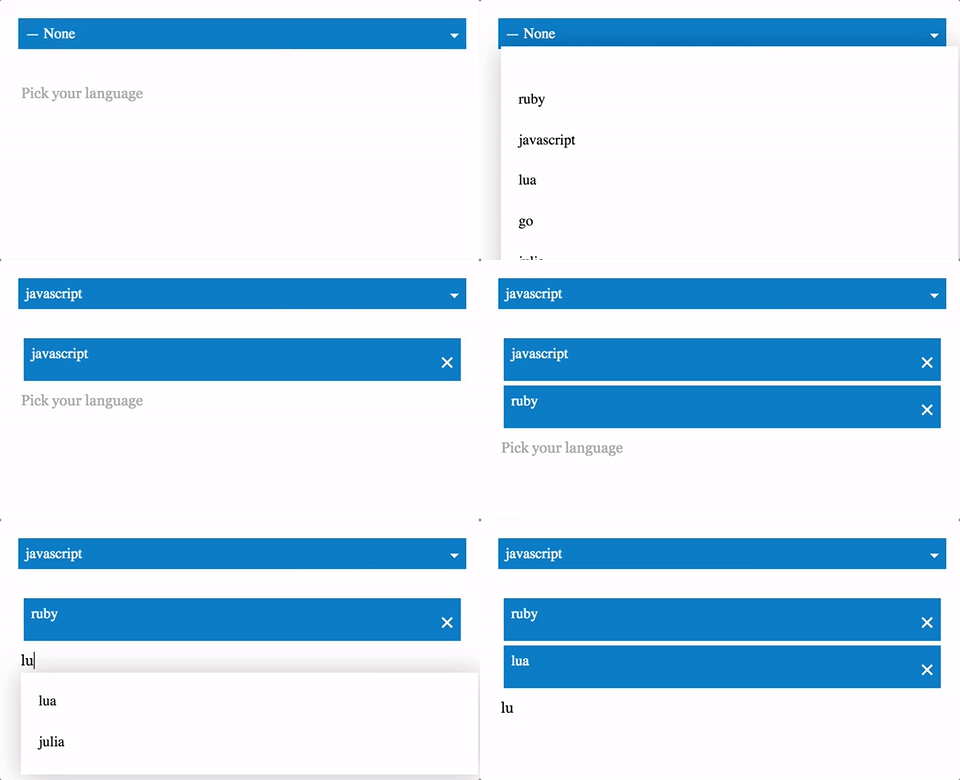
react-search is a simple Autocomplete Search component
yarn add react-search
Pass in your items as a prop to react-search. The items must be an array of objects with value and id, and any other props you may need, which will not be displayed. Check out the example for more info.
``jsx
import Search from 'react-search'
import ReactDOM from 'react-dom'
import React, { Component, PropTypes } from 'react'
class TestComponent extends Component {
HiItems(items) {
console.log(items)
}
render () {
let items = [
{ id: 0, value: 'ruby' },
{ id: 1, value: 'javascript' },
{ id: 2, value: 'lua' },
{ id: 3, value: 'go' },
{ id: 4, value: 'julia' }
]
return (
maxSelected={3}
multiple={true}
onItemsChanged={this.HiItems.bind(this)} />
ReactDOM.render(
`
To load items async before running the search to filter results you can pass a function to the getItemsAsync prop which will be triggered to load the results each key change. An example below using the github api to search for repos. Check out the example for more info.
`jsx
import Search from 'react-search'
import ReactDOM from 'react-dom'
import React, { Component, PropTypes } from 'react'
class TestComponent extends Component {
constructor (props) {
super(props)
this.state = { repos: [] }
}
getItemsAsync(searchValue, cb) {
let url = https://api.github.com/search/repositories?q=${searchValue}&language=javascript
    fetch(url).then( (response) => {
      return response.json();
    }).then((results) => {
      if(results.items != undefined){
        let items = results.items.map( (res, i) => { return { id: i, value: res.full_name } })
        this.setState({ repos: items })
        cb(searchValue)
      }
    });
  }
render () {
return (
ReactDOM.render(
`
#### items (required)value
List of Items to filter through, an array of items with and id, and any other props. value is displayed. let items = { id: 0, value: 'ruby' }, { id: 1, value: 'lua' }
#### multiple (optional)
Defaults to false, set as true if you want multiple items in the list, false for a single selection dropdown.
#### maxSelected (optional)
Defaults to 100, a maximum number of items allowed to be selected
#### placeholder (optional)
placeholder for the input
#### NotFoundPlaceholder (optional)
The placeholder shown when no results are found
#### onItemsChanged (optional)
Handler returns the items from the Search autocomplete component when items are added or removed from the list.
#### onKeyChange (optional)
Handler returns the search value on key change.
#### getItemsAsync` (optional)
A function to load items async before running the autocomplete filter.
Uses styled-components 💅 for the base styling.
[MIT