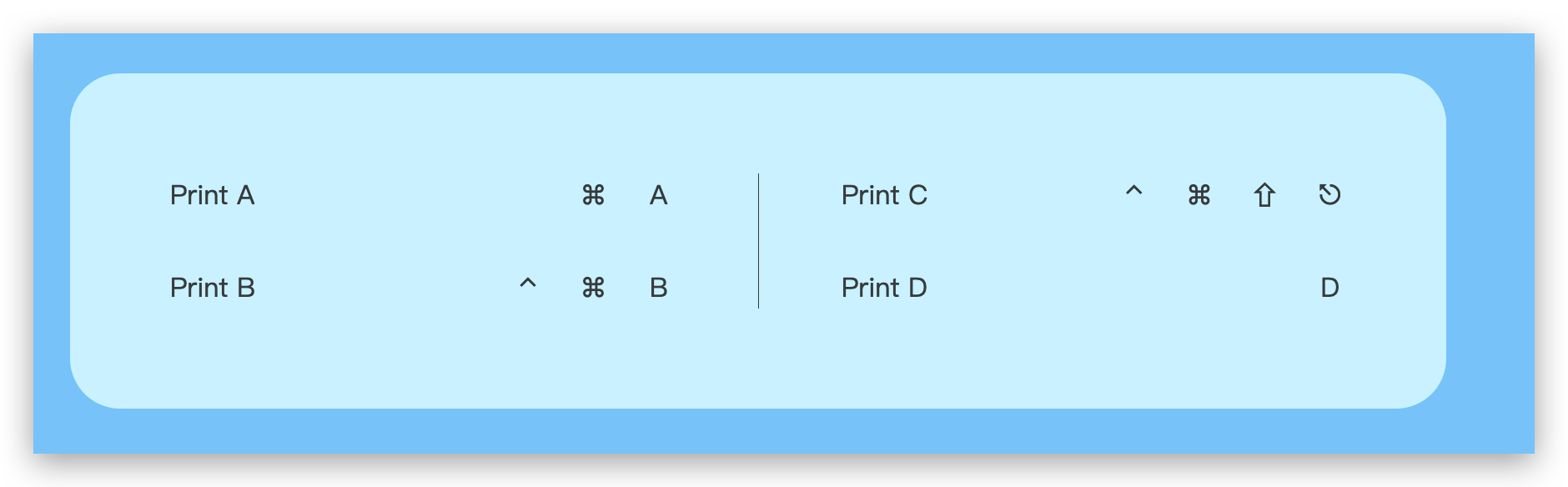
Long-press command or press `?` to present a shortcut guide for your Web application.
npm install react-shortcut-guideStatus: Alpha
Long-press command or press ? to present a shortcut guide for your Web application.
0 dependency, Gzip+minify ~ 3kB
``bash`
npm i react-shortcut-guide
After upgrade to v0.5.0, you must put react children out provider, use it as a single component without children.
`tsx`
<>
1. Add ShortcutProvider as a child element on root App component.
`tsx
import React from 'react'
import { render } from 'react-dom'
import { ShortcutProvider } from 'react-shortcut-guide'
render(
function App() {
return (
<>
darkMode: 'media',
}}
/>
)
}
`
2. Register a shortcut by hook.
`ts
import { useShortcut } from 'react-shortcut-guide'
useShortcut(
'A',
[Modifier.Meta],
(e) => {
console.log('a')
},
'Print A',
options,
)
`
ProviderOptions:
`ts
type ShortcutOptions = {
darkMode?: 'media' | 'class'
/**
* @default 'body.dark'
*/
darkClassName?: string
/**
* 长按 Command 呼出的时间
* @default 1000
*/
holdCommandTimeout?: number
/**
* 释放 Command 后的 Guide Panel 停留时间
* @default 1000
*/
stayCommandTimeout?: number
/**
* Guide 打开事件
*/
onGuidePanelOpen?: () => any
/**
* Guide 关闭事件
*/
onGuidePanelClose?: () => any
/**
* 每页最大个数,分页
* @default 12
*/
maxItemEveryPage?: number
/**
* 受控态
*/
controlledOpen?: boolean
}
`
Hook Options:
`ts``
type RegisterShortcutOptions = {
/**
* 在输入框上禁用快捷键
* @default true
*/
preventInput?: boolean
/**
* 不在 Guide 上显示这个快捷键指令
* @default false
*/
hiddenInPanel?: boolean
}
- ShortcutGuide
- How to use UIKeyCommand to add keyboard shortcuts
- [x] Pagination
- [x] Controlled status
- [ ] Shortcut priority