rmc-pull-updown-to-refresh
v2.0.4TypeScript
react pull to refresh react component
3/weekUpdated 3 years agoMITUnpacked: 33.8 KB
Published by eightfeet
npm install rmc-pull-updown-to-refreshrmc-pull-updown-to-refresh
An accessible and easy component for ReactJS
$3
8kb大小, 灵活自由,高度可配置, 支持局部滚动。
Installing
npm
``sh`
npm i rmc-pull-updown-to-refresh -S
yarnsh`
yarn add rmc-pull-updown-to-refresh
Example repo
`
ssh
git clone https://github.com/eightfeet/rmc-pull-updown-to-refresh.github
cd rmc-pull-updown-to-refresh
npm install
npm run buildcd example npm install
npm run start
`js
import React, { useCallback, useState } from 'react';
import PullToRefresh from 'rmc-pull-updown-to-refresh';function App() {
const [list, setList] = useState([1,2,3,4,5]);
const onPullDown = useCallback(
() =>
new Promise((res, rej) => {
setTimeout(() => {
rej('暂无数据');
setList([]);
}, 3000);
}),
[]
);
const onPullUp = useCallback(
() =>
new Promise((res, rej) => {
setTimeout(() => {
if (list?.length < 30) {
setList((data) => {
const newData = [...data];
for (
let index = list.length;
index < list.length + 15;
index++
) {
newData.push(index);
}
return newData;
});
res(null);
} else {
rej('别扯了!这是底线');
}
}, 3000);
}),
[list]
);
return (
loadingClassName="background"
onPullUp={onPullUp}
onPullDown={onPullDown}
pullDownText={
下拉刷新
}
loadingText={'请稍候'}
>
{list.map((item) => (
{item}
))}
{list.length ? null : 找不到数据}
);
}export default App;
`Api
typescript
interface Props {
    disablePullDown?: boolean; // 禁止下拉
    disablePullUp?: boolean; // 禁止上拉
    pullDownText?: React.ReactNode; // 下拉时展示的文本
    pullUpText?: React.ReactNode; // 上拉时展示的文本
    onPullUp?: () => Promise; // 上拉方法,要求返回promise,reject返回错误信息
    onPullDown?: () => Promise; // 下拉方法,要求返回promise,reject返回错误信息
    className?: string; //样式
    children: React.ReactNode;
    loadingClassName?: string; // 加载条样式
    loadIcon?: React.ReactNode; // 加载图标
    loadingText?: React.ReactNode; // 加载文本
    pullIcon?: React.ReactNode; // 拉动时方向图标
}
``⚠️ 注意
rmc-pull-updown-to-refresh 根据父级高度来定义滚动视窗高度,组件初始化前请定义好父级HTML元素高度,如果获取不到父级HTML元素高度,滚动视窗高度高度将被设置为浏览器窗口高度
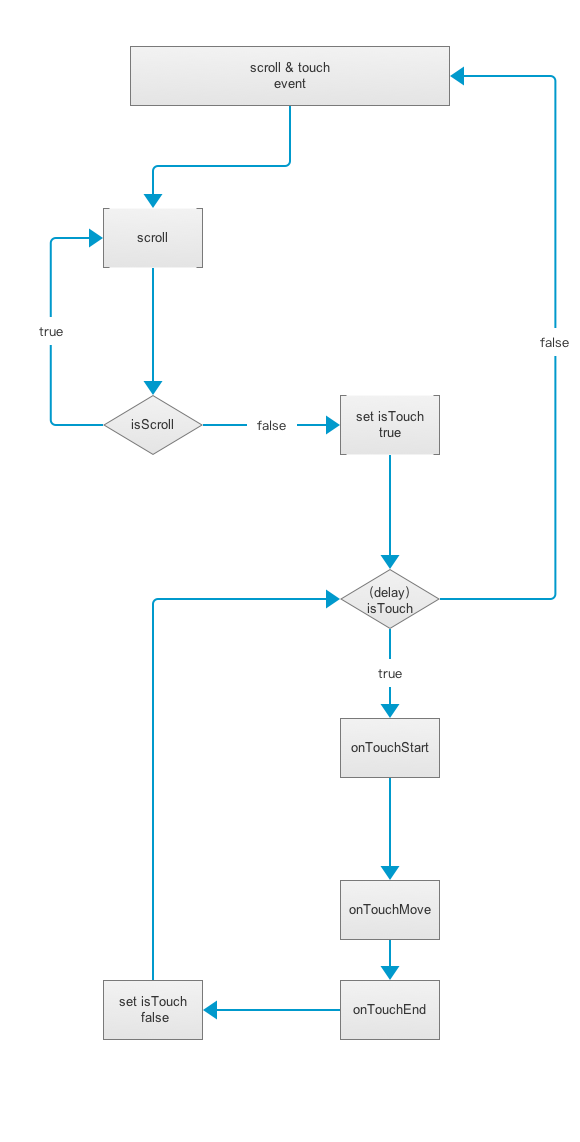
事件流 Event flow
Demo

手机扫码体验
