rt-chat-input
v1.1.0TypeScript
AI聊天输入框组件,支持文本输入、语音录制、文件上传
0/weekUpdated 3 days agoMITUnpacked: 3.5 MB
Published by yy1999
npm install rt-chat-inputrt-chat-input
一个基于 Vue 3 的多模态聊天输入框组件,集成了文本输入、语音录制(支持实时转写)、文件上传等功能。零外部 UI 框架依赖,轻量且易于集成。
预览
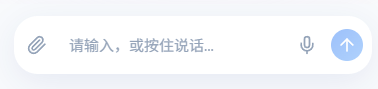
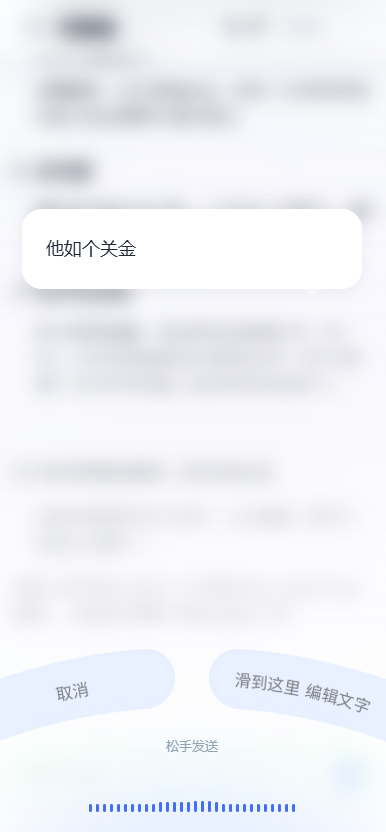
| 默认状态 | 语音录制模式 |
| :--------------------------: | :---------------------: |
| 文本输入、附件上传、语音按钮 | 波形显示、取消/编辑选项 |
特性
- 🎤 高级语音录制:支持波形可视化、音量检测、实时 WebSocket 转写。
- 📱 移动端优化:专为移动端设计的手势交互(上滑取消、侧滑编辑)。
- 📂 文件预览:内置图片和文件预览区域。
- 🎨 主题定制:内置 Light/Dark 主题,支持 CSS 变量自定义。
- 🔌 零依赖:完全移除 Element Plus 等重型 UI 库依赖,仅依赖 Vue 3。
- 🔋 H5Plus 支持:兼容 UniApp/H5Plus 环境的原生麦克风权限调用。
安装
``
bash

npm install rt-chat-input

或

yarn add rt-chat-input
`
快速使用
`vue
:ws-url="wsUrl"
@send="handleSend"
@voice="handleVoice"
@attach="handleAttach"
/>
`
$3


只需添加
fixed 属性,组件会自动固定在页面底部,无需额外 CSS。
`vue
`
API 文档


$3


#### Props


| 属性名                 | 类型                          | 默认值                    | 说明                                                           |

| ---------------------- | ----------------------------- | ------------------------- | -------------------------------------------------------------- |

|
placeholder | string | '请输入,或按住说话...' | 输入框占位符 |
| disabled | boolean | false | 是否禁用 |
| wsUrl | string | undefined | 语音转写 WebSocket 地址(见下方后端接入指南) |
| maxVoiceDuration | number | 60 | 最大录音时长(秒) |
| theme | 'light' \| 'dark' \| 'auto' | 'light' | 主题模式 |
| fixed | boolean | false | 是否开启固定底部定位(开箱即用模式) |
| bottomOffset | number \| string | 36 | 底部距离偏移量(仅 fixed=true 时有效),数字单位 px |
| showVoiceButton | boolean | true | 是否显示语音按钮 |
| showAttachmentButton | boolean | true | 是否显示附件按钮 |
| acceptFileTypes | string | 'image/*,.pdf,.doc...' | 允许上传的文件类型(默认为常见图片及办公文档格式) |
| onRequestPermission | () => Promise | undefined | 外部权限请求处理函数(返回 true 表示已获得权限) |
#### Events
| 事件名 | 参数 | 说明 |
| -------- | --------------------------------- | -------------------------------------------------- |
| send | (text: string, files: File[]) | 点击发送按钮或回车时触发 |
| voice | (audio: Blob, duration: number) | 语音录制完成时触发(仅非实时转写模式或纯语音模式) |
| change | (text: string) | 输入框内容变化时触发 |
| attach | (files: File[]) | 附件列表变化时触发 |
| error | (message: string) | 发生错误时触发 |
| stop | - | 点击停止按钮时触发(仅 loading=true 时) |
| focus | (e: FocusEvent) | 输入框获得焦点时触发 |
| blur | (e: FocusEvent) | 输入框失去焦点时触发 |
$3
如果你只需要单独的语音录制按钮,可以使用此组件。
`vue
`
后端接入指南


组件通过 WebSocket 发送 16k 采样率的 PCM 音频流,并期望接收 JSON 格式的转写结果。


$3


- 客户端发送:Raw PCM Audio (Int16, 16000Hz, Mono)

- 服务端返回:JSON 字符串
`json
{
"text": "转写文本内容",
"isFinal": false // true 表示句尾(最终结果),false 表示中间结果
}
`
$3


推荐使用后端作为代理连接 FunASR 服务(避免前端直接处理复杂的握手协议)。
`kotlin
// WebSocketHandler 实现
@Component
class RealTimeTranscriptionHandler(
private val objectMapper: ObjectMapper
) : WebSocketHandler {
// FunASR 服务地址 (e.g. ws://192.168.1.100:10095)
@Value("\${asr.service.url}")
private lateinit var asrServiceUrl: String
override fun handle(session: WebSocketSession): Mono {
val client = ReactorNettyWebSocketClient()
return client.execute(URI(asrServiceUrl)) { asrSession ->
// 1. 发送 FunASR 握手包 (必须配置如下参数以匹配模型要求)
val handshake = mapOf(
"mode" to "2pass",
"chunk_size" to listOf(5, 10, 5),
"encoder_chunk_look_back" to 4,
"decoder_chunk_look_back" to 1,
"wav_name" to "microphone",
"wav_format" to "pcm",
"audio_fs" to 16000,
"is_speaking" to true
)
val handshakeMsg = asrSession.textMessage(objectMapper.writeValueAsString(handshake))
// 2. 转发音频流 (Frontend -> FunASR)
val upstream = session.receive()
.filter { it.type == WebSocketMessage.Type.BINARY }
.map { msg ->
// 提取二进制数据并转发
val bytes = ByteArray(msg.payload.readableByteCount())
msg.payload.read(bytes)
asrSession.binaryMessage { it.wrap(bytes) }
}
// 3. 接收结果并转换 (FunASR -> Frontend)
val downstream = asrSession.receive()
.map { it.payloadAsText }
.mapNotNull { json ->
// 解析 FunASR 响应并转换为组件所需格式
val node = objectMapper.readTree(json)
val text = node.path("text").asText()
val mode = node.path("mode").asText()
if (!text.isNullOrBlank()) {
val response = mapOf(
"text" to text,
"isFinal" to (mode == "2pass-offline")
)
session.textMessage(objectMapper.writeValueAsString(response))
} else null
}
// 合并流:发送握手 + 双向转发
// 关键修复:在前端断开或流结束时,发送 {"is_speaking": false} 以触发 2pass-offline 最终结果
val endSignal = Mono.defer {
Mono.just(asrSession.textMessage("{\"is_speaking\":false}"))
}
asrSession.send(upstream.startWith(handshakeMsg).concatWith(endSignal))
.then(session.send(downstream))
}
}
}
`
主题定制


组件使用 CSS 变量进行样式定义,你可以通过覆盖这些变量来定制主题:
`css
:root {
--chat-primary: #409eff; / 主色调 /
--chat-bg: #ffffff; / 输入框背景色 /
--chat-text: #303133; / 文字颜色 /
--chat-border-radius: 8px; / 圆角 /
/ 页面背景匹配 (用于 fixed 模式底栏) /
--chat-page-bg: #f8fafc; / 浅色模式页面背景 /
--chat-page-bg-dark: #0f172a; / 深色模式页面背景 /
}
`
更多变量请参考 src/styles/variables.css`。
License
MIT