Install npm modules programmatically at runtime
npm install runtime-npm-installInstall npm modules programmatically
- under the hood, uses globally installed npm through
npm-install-to
- takes packages in the equivalent format as npm install
- @scope/name
- name@tag/version
- githubusername/repo
- etc.
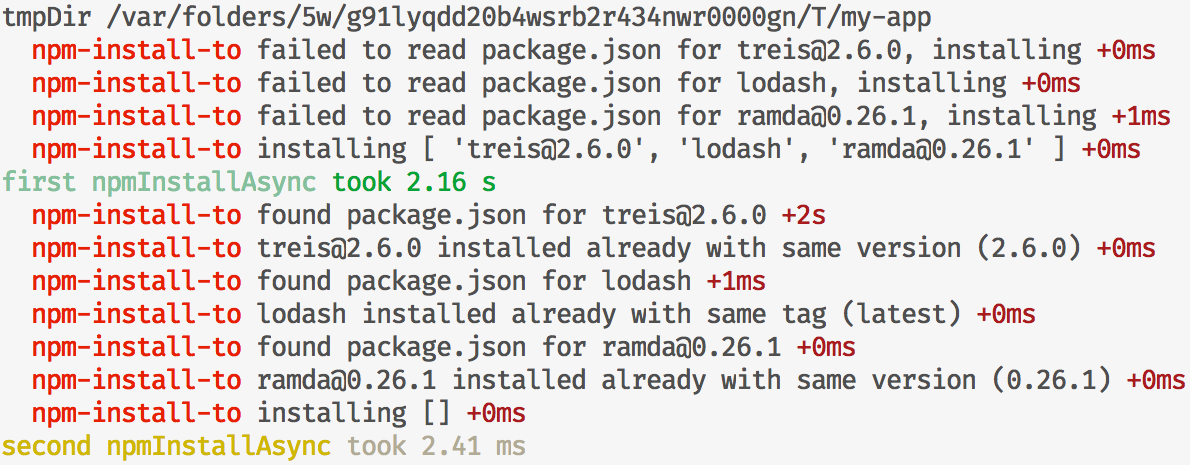
- once installed packages will resolve instantly due to caching
``sh`
npm install runtime-npm-install
Provides two functions, of which npmInstallAsync returns metadata of installednpmImportAsync
modules, while returns a list of what installed modules export.
The argument installPath determines where modules should be npm installed onnpm-install-to
the file system. It defaults to a temporary directory, but should be given if
you wish subsequent invocations to either function to be quick. See for more on
the caching.
The argument of packages is a list of package specs as strings, correspondingnpm install
to how command is given packages to be installed. More informationnpm help install
on that available with .
#### npmInstallAsync(packages: string[], installPath?: string, npmInstallToOpts?: Object): Promise<...>
Installs specified packages, returning a promise that resolves to an object
containing output of npm install and metadata of installed packages.
##### example
`js`
const { npmInstallAsync } = require('../')
const path = require('path')
const tmpDir = path.join(require('os').tmpdir(), 'my-app')
npmInstallAsync([
'treis@2.6.0',
'lodash',
'ramda@0.26.1'
], tmpDir)
.then(console.log)
##### output
`js`
{ packages:
[ { spec: 'treis@2.6.0',
name: 'treis',
json: [Object],
path:
'/var/folders/5w/g91lyqdd20b4wsrb2r434nwr0000gn/T/my-app/node_modules/treis' },
{ spec: 'lodash',
name: 'lodash',
json: [Object],
path:
'/var/folders/5w/g91lyqdd20b4wsrb2r434nwr0000gn/T/my-app/node_modules/lodash' },
{ spec: 'ramda@0.26.1',
name: 'ramda',
json: [Object],
path:
'/var/folders/5w/g91lyqdd20b4wsrb2r434nwr0000gn/T/my-app/node_modules/ramda' } ],
npmOutput:
'+ treis@2.6.0\n+ ramda@0.26.1\n+ lodash@4.17.11\nadded 12 packages from 9 contributors and audited 15 packages in 1.492s\nfound 0 vulnerabilities' }
#### npmImportAsync(packages: string[], installPath?: string, npmInstallToOpts?: Object): Promise<...>
Installs specified packages, returning exports corresponding to each package as
a list.
#### getPkgsToBeInstalled(packages: string[], installPath: string): Promise
Use to check which given packages would be installed by either of the functions.
This function comes directly from npm-install-to.
##### example
`js
const { npmImportAsync } = require('runtime-npm-install')
;(async () => {
const [treis, _, R] = await npmImportAsync([
'treis@2.6.0',
'lodash',
'ramda@0.26.1'
])
R.add(1, _.add(5, 1)) // 7
})()
`
`js
const { npmInstallAsync } = require('npm-install-to')
const path = require('path')
const taim = require('taim')
const tmpDir = path.join(require('os').tmpdir(), 'my-app')
console.log('tmpDir', tmpDir)
;(async () => {
await taim('first npmInstallAsync', npmInstallAsync)([
'treis@2.6.0',
'lodash',
'ramda@0.26.1'
], tmpDir)
await taim('second npmInstallAsync', npmInstallAsync)([
'treis@2.6.0',
'lodash',
'ramda@0.26.1'
], tmpDir)
})()
``