Sphinx chat bots
npm install sphinx-bot
The Sphinx Javascript bot framework is inspired by Discord's bot creation library. So far we have only implemented simple Message creation, but there are exciting times ahead for bot developers on Sphinx!
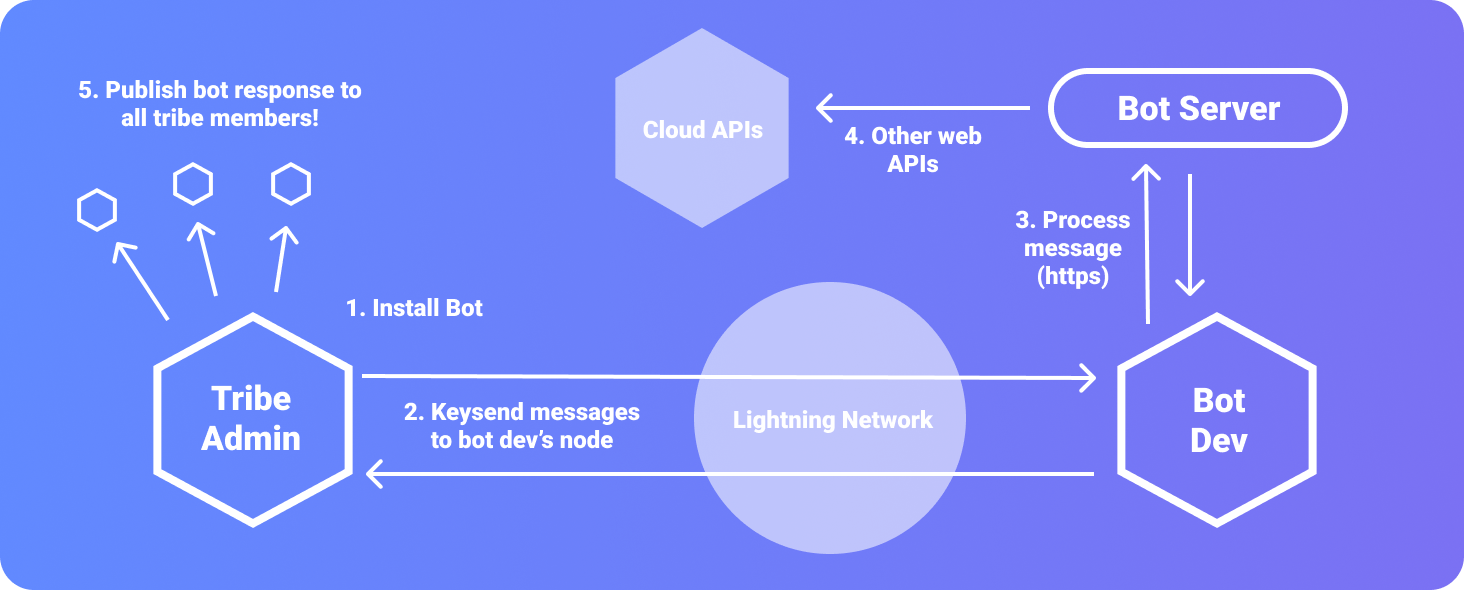
Every sphinx-relay instance has a built-in bot called MotherBot. MotherBot is how you can search, install, and uninstall bots.
- /bot search Bitcoin
- /bot install btc
- /bot uninstall btc
Bots can be created on your sphinx-relay instance. By creating a bot, you are generating a bridge from the Lightning Network to the regular web (http). Bots are secured with a secret key that is generated when a bot is created. HTTPS should be used for all Bot endpoints.
connect your bot
``js`
const client = new Sphinx.Client();
client.login(process.env.SPHINX_TOKEN);
create a bot Message
`js`
const embed = new Sphinx.MessageEmbed()
.setAuthor("TestBot")
.setDescription("Welcome to TestBot!");
respond to a "bot install" message
`js`
client.on(msg_types.INSTALL, async (message) => {
const embed = new Sphinx.MessageEmbed()
.setAuthor("TestBot")
.setDescription("Welcome to TestBot!")
.setThumbnail("");
message.channel.send({ embed });
});
respond to a chat message
`js`
client.on(msg_types.MESSAGE, async (message) => {
// do something here!
const embed = new Sphinx.MessageEmbed()
.setAuthor("TestBot")
.setTitle("TestBot Message:")
.addFields([
{ name: "Item #1:", value: "hello", inline: true },
{
name: "Item #2:",
value: "hello again",
inline: true,
color: "#00FF00",
},
])
.setThumbnail("");
message.channel.send({ embed });
});
respond to a chat message outside of the event emitter
`tsThis is a message!
client.channels.cache.get(CHANNEL).send(
content: ,`
});
boost a tribe member's message
`ts`
// you can get CHANNEL from a "message.channel.id"
client.channels.cache.get(CHANNEL).pay(
amount: 1000,
reply_id: "xxx", // optional uuid "message.reply_id"
recipient_id: 1, // id of the tribe member "message.member.id"
});
- ### new Sphinx.Client()
- ###
- ### client.on(msg_types.INSTALL, callback)
- ###
- ### setTitle(title:string)
- ###
- ###
- ###
- ###
- ###
- ###
- ###
`json``
// "fields" are items in a list:
{
"name": "string",
"value": "string",
"inline?": "boolean",
"color?": "string"
}