bash

npm i spread-table
`
or yarn
`bash
yarn add spread-table
`
$3
`typescript
import { SpreadTableModule } from "spread-table";
@NgModule({
imports: [
// Other module imports
...
// spread-table modules
SpreadTableModule,
],
})
export class AppModule {}
`
$3
`typescript
import { HttpClient } from "@angular/common/http";
import { Component } from "@angular/core";
import { Column } from "spread-table";
@Component({
selector: "app-root",
templateUrl: "./app.component.html",
styleUrls: ["./app.component.scss"],
})
export class AppComponent {
title = "spread-table-test";
columns: Column[] = [
new Column({ displayName: 'Id', name: 'id', editable: false, resizable: false }),
new Column({ displayName: 'Album Id', name: 'albumId', minWidth: 120 }),
new Column({ displayName: 'Title', name: 'title', minWidth: 400, validators: [RequiredValidator.required(), RequiredValidator.requiredString()] }),
new Column({ displayName: 'Url', name: 'url', minWidth: 300 }),
new Column({ displayName: 'Thumbnail Url', name: 'thumbnailUrl', minWidth: 300 })];
data: any;
gridInstance: ISpreadTable = new SpreadTable();
@ViewChild('spreadTable') set grid(gridInstance: SpreadTable) {
this.gridInstance = gridInstance;
}
constructor(private httpClient: HttpClient) {
this.getData();
}
private async getData() {
const products: any = this.httpClient.get(
"https://jsonplaceholder.typicode.com/photos"
);
}
}
`
$3
`html
style="height: 700px;">
[columns]="columns"
[minColumnWidth]="100"
[rowHeight]="36"
[indexWidth]="60"
[rawData]="data"
[undoRedoStackSize]="20"
[extraContextMenuItems]="extraContextMenuItems"
[extraColumnMenuItems]="extraColumnMenuItems"
(cellValueChange)="onCellValueChange($event)"
(contextMenuEvent)="onContextMenuEvent($event)"
(columnMenuEvent)="onColumnMenuEvent($event)">
Validators


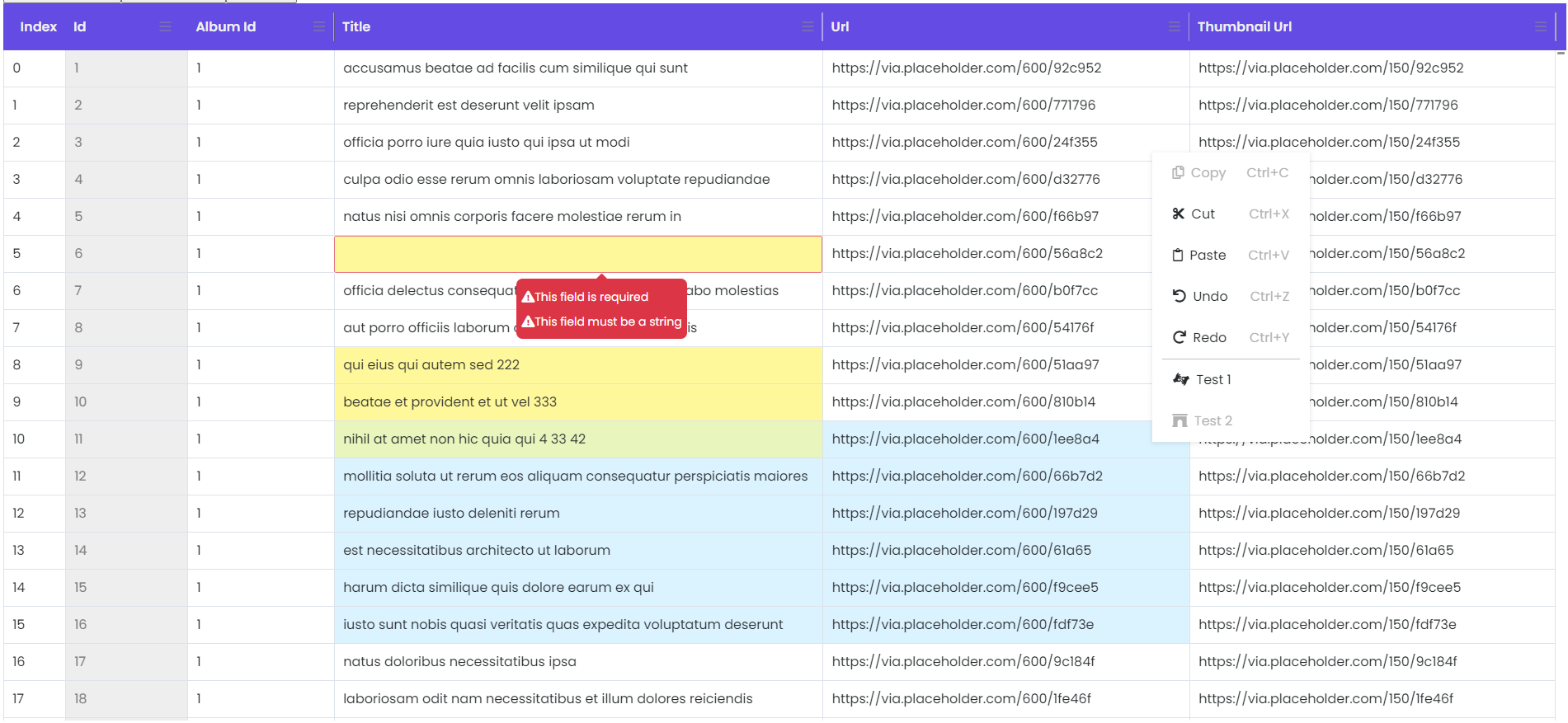
In order for the validators to work correctly they have to be custom. Even the required validator. This way you can set a custom message for the error. See the example bellow:


$3
`typescript
import { AbstractControl, Validators } from "@angular/forms";
export class RequiredValidator extends Validators {
public static required() {
return (control: AbstractControl): { [key: string]: any } | null =>
control.value ? null : { required: "This field is required" };
}
}
`
$3
`typescript
columns: Column[] = [
new Column({
displayName: "Id",
name: "id",
width: "40px",
editable: false,
}),
new Column({
displayName: "Album Id",
name: "albumId",
width: "70px",
validators: [RequiredValidator.required()]
}),
...
];
`
$3

!Validations


API

$3

| Input                   | Type               | Default                              | Required | Description                                                                                                                                                                    |

|-------------------------|--------------------|--------------------------------------|----------|--------------------------------------------------------------------------------------------------------------------------------------------------------------------------------|

| [rawData]               | any                |                                      | yes      | json data for the table                                                                                                                                                        |

| [columns]               | Column[]           |                                      | yes      | column definition for the table. The columns should match
the data structure in rawData and also configure the properties
of the columns in the grid. See Column class. |

| [minColumnWidth]           | number             | 100                                  | no       | default column min-width in px                                                                                                                                                 |

| [rowHeight]              | number             | 24                                   | no       | default row height in px                                                                                                                                                       |

| [indexWidth]            | number             | 60                                   | no       | default Index column width in px                                                                                                                                               |

| [headerBgColor]         | string             | '#634be3'                            | no       | header background color                                                                                                                                                        |

| [headerColor]           | string             | '#efefef'                            | no       | header text color                                                                                                                                                              |

| [extraContextMenuItems] | ContextMenuModel[] | copy,cut,paste,undo,redo             | no       | you can define extra context menu items for the grid.
See ContextMenuModel class                                                                                            |

| [columnMenuItems]       | ContextMenuModel[] | reset column size, reset all columns | no       | you can define extra column menu items for the grid.
See ContextMenuModel class

$3

| Output             | Type             | Description                                                                     |

|--------------------|------------------|---------------------------------------------------------------------------------|

| (cellValueChange)  | Change[]         | event fired when a cell value is edited.
See Change class.                   |

| (contextMenuEvent) | ContextMenuModel | event fired when a context menu item is clicked.
See ContextMenuModel class. |

| (columnMenuEvent)  | ContextMenuModel | event fired when a column menu item is clicked.
See ContextMenuModelClass.   |


$3
`typescript
export class Column {
public name = '';
public displayName?= 'N/A';
public minWidth?:number;
public editable?= true;
public resizable?= true;
public validators?: any[] | undefined;
constructor(obj?: Column) {
Object.assign(this, obj);
if (!obj?.displayName) {
this.displayName = obj?.name;
}
}
}
`
`typescript
export class ContextMenuModel {
faIconName?: string = '';
menuText?: string = '';
menuEvent?: string = '';
shortcut?: string = '';
disabled?: boolean = false;
}
`
`typescript
export class Change {
beforeValue: any;
afterValue: any;
coordinates = { rowIndex: 0, columnIndex: 0 }
constructor(pagObj?: Change) {
Object.assign(this, pagObj);
}
}
`
Be kind

Idea behind:
The idea was to implement a web spreadsheet with minimal functionality. The beauty of this plugin is that you can build on this and implement your custom scenarios rather than use some generic implementation of different features.
`
Note: This plugin is till work in progress
`
Versions

$3

-  update to angular 14

$3

-  fix copy/paste in Firefox

$3


- update to Angular 13.3.11

- added possibility to create your customer renderer and editor functionality(see Demo)

- added examples for add, remove, rename column

- undoRedoService stack size can now be set

$3

- fixed clipboard copy/paste for browsers without clipboard API.Copy/Paste now works also in Firefox.

$3

- you can now have resizable columns. Changed width property to minWidth

- added column menu: reset column width/all columns width

- you can make an instance of the grid and use it to change properties or to change/get data from the grid
`typescript
...
gridInstance: ISpreadTable = new SpreadTable();
@ViewChild('spreadTable') set grid(gridInstance: SpreadTable) {
this.gridInstance = gridInstance;
}
...
``