svelte-cartesian
v1.1.5
A single component that helps render prop combinations (the "Cartesian Product") for visual regression testing.
0/weekUpdated 1 years agoMITUnpacked: 24.1 KB
Published by Enrico Sacchetti
npm install svelte-cartesianSvelte Cartesian
A single component that helps render prop combinations. It can be used with visual regression test software such as Playwright
or Storybook (see examples).
Its name comes from "Cartesian Product" in which an intersection of two
or more arrays form a matrix, such as:
``
[a, b] * [x, y] --> [[a, x], [a, y], [b, x], [b, y]]
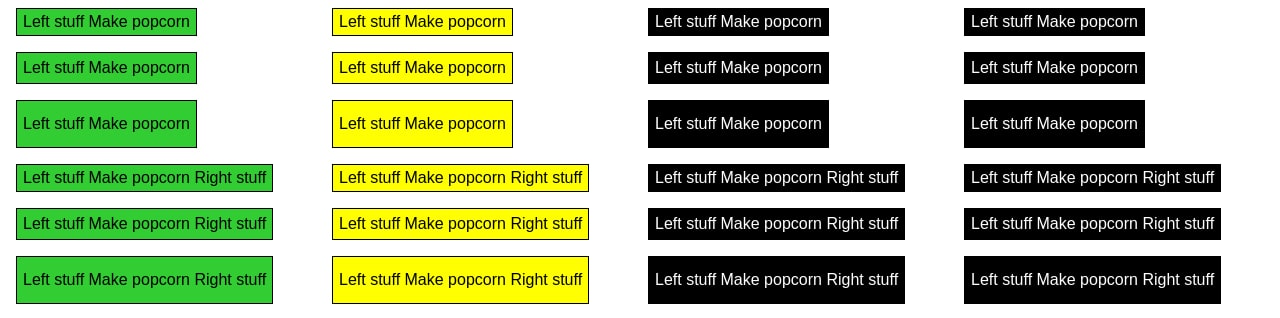
- Why
- Before using svelte-cartesian
- After using svelte-cartesian
- Setup
- Basic usage
- Usage with slots
- Available slots
- Adding labels
- Styling
- props
- Examples
- Usage with Playwright
- Usage with Storybook
- Svelte 5 usage (experimental)
- Project roadmap
- Goals
- Non-goals
- Credits
Why
When building reusable components, testing them helps build confidence that
they'll work as expected in one or many consuming applications, and helps ensure
they remain stable as features are added. This includes, but is not limited to:
1. Type checking
2. Unit tests
3. Integration tests
4. Visual regression tests
5. End to end tests
At various stages of a UI library's maturity, different levels of test coverage
become more necessary as the library matures.
svelte-cartesian helps with point 4: Visual regression tests. Today, rendering{#each}
many combinations of a component requires nested loops and some stylesvelte-cartesian
boilerplate. solves this in one component that accepts prop
values you wish to test, and then renders prop combinations.
$3
`html
{#each ['primary', 'secondary'] as variant}
{#each ['small', 'medium', 'large'] as size}
{#each ['main', 'common', 'ghost'] as prominence}
{/each}
{/each}
{/each}
`
$3
`html
props={{
variant: ['primary', 'secondary'],
size: ['small', 'medium', 'large'],
prominence: ['main', 'common', 'ghost']
}}
>
Dispense popcorn
`
Setup
1. Install package
`bash`
npm install -D svelte-cartesian
2. Add component to your page.
`html`
3. Pass props with array of potential values, including an explicit undefined
where applicable.
Basic usage
- Pass a component to the Component prop.props
- Pass an object to containing possible prop keys for your passed-in
component, with each prop key containing an array of potential values.
`html
props={{
variant: ['primary', 'secondary'],
size: ['medium', 'large']
}}
>
Click me
`
Usage with slots
- Pass your component into the default slot.
- Spread the innerProps slot prop to your component, which will render a
single prop combination at every iteration.
- This is used to manually define named slot combinations for your provided
component.
`html
`
$3
| slot name | slot props | description |
| --------- | ----------------------------- | ---------------------------------------------------------------------------------------------------------------------------------------------------------------------------------------------------------------------------------------- |
| _default_ | let:innerProps | Default slot. Contents get passed to provided Component. When asChild is set to true, contents MAY contain provided Component and its respective slots; see usage with slots for more details. |label
| | let:label, let:innerProps | Provide your own label, styles, and logic instead of the default provided label. |
Adding labels
Use the labels prop to generate labels next to every component instance.
`html`
Allowed values for the labels prop:
- true: same as 'short'.'short'
- : display comma-separated values, skip objects.'long'
- : display line-separated key-value pairs, represent object values as their type name.'long-with-objects'
- : same as 'long', but with full object definitions.
Default labelling behaviour can be overridden with the label slot.
`html
Props
{label}
Props
{customLabel(innerProps)}
`
Styling
has these default CSS behaviours:
- Use CSS Grid with a gap of 1rem.padding
- is set to 0.5rem 1rem to allow consistent space when multiple
components are rendered one after the other.grid-template-columns
- is set to var(--columns, repeat(2, 1fr)) for a--columns
default 2-column grid overridable with the CSS variable.
There are a few ways to override its styles:
1. Via the --columns CSS variable; you may use Svelte --style-props orstyle="--columns: repeat(3, 1fr)"
to set a new value.style
2. Use the attribute that overrides the default style viadivAttributes
. The same technique can be applied to your own passed-instyle
components so long as it accepts via $$restProps or pass-through props.class
3. Pass in global class names to the attribute that gets passed in via divAttributes.
4. Wrap with your own element and styles, and set the unstyled
prop to .
`html
props={{
size: ['small', 'medium'],
variant: ['primary', 'secondary']
}}
--columns="repeat(4, 1fr)"
style="background-color: green"
>
`
props
props| prop | type | description | 1. Create a page using See complete Playwright examples in end to end 1. Set up a component story. See See Svelte 5 README. - Add deeper styling flexibility. - Svelte 3 support. - react-cartesian
| ---------------- | ------------------------------------------------------------------------------- | ------------------------------------------------------------------------------------------------------------------------------------------------------------------------------------------------- |
| Component | ComponentType | Required: A Svelte component. |props
| | Record | Required: An object containing prop names and an array of potential values. |asChild
| | ?boolean=false | Renders the default slot's contents. Each Cartesian's iteration will pass innerProps as slot props. Default value false. See usage with slots for more details. |labels
| | ?(undefined \| boolean \| 'short' \| 'long' \| 'long-with-objects')=undefined | Generate labels under every iteration. See adding labels for detailed usage. |unstyled
| | ?boolean=false | Disable built-in CSS. |divAttributes
| | ?SvelteHTMLElements["div"]={} | Attributes to be spread onto the wrapping element. |let:innerProps
| | Record | Provides a single combination of props at every iteration to the _default_ slot. Use this alongside asChild to spread innerProps to your nested component. |let:label
| | string | Generated label for a given instance. This is provided to the label slot. See adding labels for more details. |Examples
$3
2. Set up a test to take a screenshot of your page.js`
test("default slot", async ({ page }) => {
await page.goto("localhost:4173/")
await expect(page).toHaveScreenshot()
})
tests.$3
2. Import to render prop combinations:`html`
storybook-addon-pseudo-states
for more inspiration.Svelte 5 usage (experimental)
Project roadmap
$3
- Improve types.$3
- Support other JS frameworks; though I may export Credits
- Radix Svelte, and by extension
Radix UI