tagcloud-hls
v1.1.0TypeScript
3D TagCloud with adaptive layout - A 3D interactive tag cloud library with rectangular layouts, auto-sizing, weight-based font sizing and HSL color gradients
0/weekUpdated 5 months agoMITUnpacked: 131.6 KB
Published by Hoyt
npm install tagcloud-hlsEnglish | 中文
TagCloud-HLS



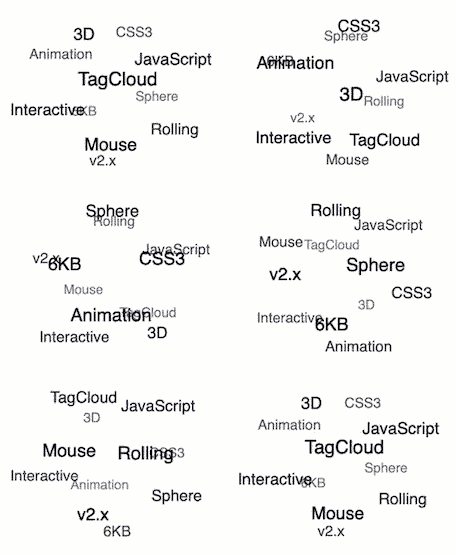
It's 3D TagCloud that rolling with the mouse. It's only 6KB in minsize and doesn't depend on other libraries. Examples
✨ New Features: Weight-based font sizing, HSL color gradients, object format support, rectangular layouts, auto-sizing
- Usage
- npm
- Browser
- React
- Constructor
- TagCloud(container, texts, options)
- container
- texts
- options
- options.radius
- options.maxSpeed
- options.initSpeed
- options.direction
- options.keep
- options.containerClass
- options.itemClass
- options.useContainerInlineStyles
- options.useItemInlineStyles
- options.useHTML
- options.minFontSize
- options.maxFontSize
- options.hls
- Instance
- tagcloud.update(texts)
- tagcloud.pause()
- tagcloud.resume()
- tagcloud.destroy()
- Advanced Examples
- Weight-based Font Sizes and Colors
- Mixed Format Usage
- Dynamic Updates with Weights
- Custom event handler
- Use event delegation bind event listener to TagCloud instance root element
- License
Usage
$3
``bash`
$ npm i -S tagcloud-hls
`js
const TagCloud = require('tagcloud-hls');
// Or use ES6 modules
import TagCloud from 'tagcloud-hls';
const container = '.tagcloud';
// Traditional string format
const texts = [
'3D', 'TagCloud', 'JavaScript',
'CSS3', 'Animation', 'Interactive',
'Mouse', 'Rolling', 'Sphere',
'6KB', 'v2.x',
];
// Or use object format with weights
const textsWithWeights = [
{text: '3D', pr: 8},
{text: 'TagCloud', pr: 10},
{text: 'JavaScript', pr: 9},
{text: 'CSS3', pr: 6},
{text: 'Animation', pr: 7},
{text: 'Interactive', pr: 5},
{text: 'Mouse', pr: 4},
{text: 'Rolling', pr: 3},
{text: 'Sphere', pr: 2},
{text: '6KB', pr: 1},
{text: 'v2.x', pr: 1}
];
const options = {
radius: 120,
maxSpeed: 'normal',
initSpeed: 'normal',
direction: 135,
keep: true,
hls: true, // Enable weight-based coloring
minFontSize: 12, // Minimum font size
maxFontSize: 24 // Maximum font size
};
TagCloud(container, textsWithWeights, options);
`
$3
`html`
`js
// Basic usage
const container = '.tagcloud';
const texts = ['HTML', 'CSS', 'JavaScript', 'React', 'Vue'];
const options = {
hls: true, // Enable HSL color gradients
minFontSize: 14,
maxFontSize: 20,
};
TagCloud(container, texts, options);
// With weight support
const textsWithWeight = [
{ text: 'React', pr: 5 },
{ text: 'Vue', pr: 4 },
{ text: 'Angular', pr: 3 },
{ text: 'jQuery', pr: 2 },
];
TagCloud(container, textsWithWeight, options);
`
$3
There is a React Component by Frank-Mayer on npm: @frank-mayer/react-tag-cloud
Constructor
$3
Returns tagcloud instance.
#### container
Type: String or HTMLElement or Array
Container for constructing a tagcloud.
#### texts
Type: Array
List of tag text for init. Supports both string and object formats:
String format (traditional):
`js`
const texts = ['HTML', 'CSS', 'JavaScript', 'React'];
Object format (with weight support):
`js`
const texts = [
{text: 'HTML', pr: 1},
{text: 'CSS', pr: 3},
{text: 'JavaScript', pr: 10},
{text: 'React', pr: 8}
];
Mixed format:
`js`
const texts = [
'HTML', // Default pr = 0
{text: 'JavaScript', pr: 8}, // Custom weight
'CSS' // Default pr = 0
];
- String format: Traditional usage, automatically assigned pr = 0
- Object format: Allows custom weight ( value) for font size and color calculation
- Mixed format: Combines both string and object formats in the same array
#### options
Type: Object
##### options.radius
Type: Number\100
Default: \px
Unit:
Rolling radius.
##### options.maxSpeed
Optional: 'slow', 'normal', 'fast'\'normal'
Default:
Rolling max speed.
##### options.initSpeed
Optional: 'slow', 'normal', 'fast'\'normal'
Default:
Rolling init speed.
##### options.direction
Type: Number\135
Default: (right-bottom)\deg
Unit: clockwise
Rolling init direction, e.g. 0 (top) , 90 (left), 135 (right-bottom) ...
##### options.keep
Type: Boolean\true
Default:
Whether to keep rolling after mouse out area. Default true (decelerate to rolling init speed, and keep rolling with mouse).
##### options.reverseDirection
Type: Boolean\false
Default:
Whether to reverse the direction when the mouse controls the direction. Default false.
##### options.containerClass
Type: String\tagcloud
Default:
Css class to be used for the tagcloud container. Default tagcloud
##### options.itemClass
Type: String\tagcloud--item
Default:
Css class to be used for tagcloud items. Default tagcloud--item
##### options.useContainerInlineStyles
Type: Boolean\true
Default:
Add inline styles to the tagcloud container which are required for correct view. When this option is disabled you have to add the css by yourself. Default true
##### options.useItemInlineStyles
Type: Boolean\true
Default:
Add common inline styles to the items which are required for correct view. When this option is disabled you have to add the css by yourself. Default true
##### options.useHTML
Type: Boolean\false
Default:
Add html tags with text.Using this will help you add style on elements. Default false
##### options.minFontSize
Type: Number\12
Default: \px
Unit:
Minimum font size for tags. When minFontSize equals maxFontSize, all tags will have the same font size regardless of their weight.
##### options.maxFontSize
Type: Number\12
Default: \px
Unit:
Maximum font size for tags. Tags with higher weight (pr value) will have larger font sizes up to this maximum.
Font Size Examples:
`js
// Same font size for all tags
TagCloud(container, texts, {
minFontSize: 14,
maxFontSize: 14
});
// Dynamic font size based on weight
TagCloud(container, texts, {
minFontSize: 12,
maxFontSize: 24
});
`
##### options.hls
Type: Boolean\false
Default:
Enable HSL color mode based on tag weight. When enabled, tags will be colored from cool to warm colors based on their pr values.
Color Algorithm:
- Low weight: Blue (cool colors)
- Medium weight: Green/Cyan
- High weight: Red/Yellow (warm colors)
- Hue range: 240° (blue) → 0° (red)
- Saturation: 60% → 100%
- Lightness: 65% → 35%
HLS Color Examples:
`js
// Enable weight-based coloring
TagCloud(container, texts, {
hls: true,
minFontSize: 12,
maxFontSize: 20
});
// Disable coloring (default CSS colors)
TagCloud(container, texts, {
hls: false
});
`
##### options.width
Type: Number or null\null
Default: \px
Unit:
Specify container width. If null, will automatically use parent container's width.
##### options.height
Type: Number or null\null
Default: \px
Unit:
Specify container height. If null, will automatically use parent container's height.
##### options.autoResize
Type: Boolean\true
Default:
Enable automatic resizing functionality. When enabled, the tag cloud will automatically recalculate layout when parent container size changes. Supports rectangular layouts (aspect ratio other than 1:1).
Examples:
`javascript
// Auto-adapt to parent container size (rectangular layout supported)
TagCloud('#container', texts, {
// width and height will be auto-detected from parent
autoResize: true
});
// Fixed size rectangular layout
TagCloud('#container', texts, {
width: 600,
height: 300,
autoResize: false
});
// Responsive square layout
TagCloud('#container', texts, {
width: 400,
height: 400,
autoResize: true
});
`
Instance
$3
Update tag list.
$3
Pause the tagcloud animation.
$3
Resume the tagcloud animation.
$3
Destroy the tagcloud instance.
Advanced Examples
$3
`js
// Technology stack with different popularity weights
const techStack = [
{text: 'JavaScript', pr: 95},
{text: 'React', pr: 88},
{text: 'Node.js', pr: 82},
{text: 'Vue.js', pr: 75},
{text: 'Angular', pr: 68},
{text: 'TypeScript', pr: 85},
{text: 'Express', pr: 72},
{text: 'MongoDB', pr: 65}
];
TagCloud('.tech-cloud', techStack, {
radius: 150,
hls: true, // Enable color gradients
minFontSize: 14, // Smallest font
maxFontSize: 28, // Largest font
maxSpeed: 'normal',
initSpeed: 'normal'
});
`
$3
`js
// Combining strings and objects
const mixedTags = [
'HTML', // Default weight (pr: 0) - Blue color
'CSS', // Default weight (pr: 0) - Blue color
{text: 'JavaScript', pr: 10}, // High weight - Red color, large font
{text: 'TypeScript', pr: 7}, // Medium-high weight - Orange color
'Sass', // Default weight (pr: 0) - Blue color
{text: 'React', pr: 9}, // High weight - Red-orange color
{text: 'Vue', pr: 6} // Medium weight - Yellow-green color
];
TagCloud('.mixed-cloud', mixedTags, {
radius: 120,
hls: true,
minFontSize: 12,
maxFontSize: 22
});
`
$3
`js
const cloud = TagCloud('.dynamic-cloud', initialTags, {
hls: true,
minFontSize: 12,
maxFontSize: 20
});
// Update with new weighted data
setTimeout(() => {
const newTags = [
{text: 'Svelte', pr: 8},
{text: 'Next.js', pr: 9},
{text: 'Nuxt.js', pr: 7},
{text: 'Vite', pr: 6}
];
cloud.update(newTags);
}, 3000);
`
Custom event handler
$3
The following is an example, click the TagCloud sub-item to jump to Google to search for keywords.
`javascripthttps://www.google.com/search?q=${e.target.innerText}
let rootEl = document.querySelector('.content');
rootEl.addEventListener('click', function clickEventHandler(e) {
if (e.target.className === 'tagcloud--item') {
window.open(, '_blank');``
// your code here
}
});
License
MIT