Task-runner is a node UI framework for task execution. Developer can only focus on the task logic.
npm install terminal-task-runnerterminal-task-runner
===========
[![NPM version][npm-image]][npm-url]
![][david-url]
![][travis-url]
![][dt-url]
![][license-url]
> Terminal task execution system
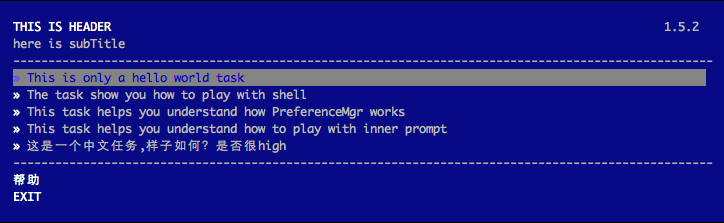
Terminal-task-runner is a node UI framework for task execution. Developer can only focus on the task logic. Framework will generate the terminal menu for you.
terminal-task-runner is now used by sero-cli, modou-terminal-controller, fe-interview
terminal-task-runner is runner system with a lovely terminal UI. Which also provide some cool features to ease the way of implementing tasks.
``shell`
npm install terminal-task-runner --save
`JavaScript
var TaskRunner = require('terminal-task-runner');
TaskRunner.createMenu({
title: 'This is Header',
subtitle: 'here is subTitle'
});
`
By doing above, you've created a very simple terminal menu as following:

How to write your own task
> Welcome to play with the example as your skeleton.
#### options
Type: Object
Options to pass to createMenu
#### options.title
Type: String
Default:
The title displayed on the top of the terminal ui.
#### options.subtitle
Type: String
Default:
The subtitle displayed below the title.
#### options.helpTxt
Type: String
Default:
The text will be displayed if you have set helpFile.
#### options.exitTxt
Type: String
Default:
The text will be displayed at the bottom of the terminal UI.
#### options.width
Type: number
Default: 100
menu width in columns.
#### options.x
Type: number
Default: 3
top-left corner x offset.
#### options.y
Type: number
Default: 2
top-left corner y offset.
#### options.taskDir
Type: String
The location of where the tasks placed.
#### options.taskList
Type: array
Optional: true
The the list of task folders. If not specified, task-runner will go through all the folders under taskDir.
#### options.helpFile
Type: String
The location of where the help file placed. A help file should be written in colors-tmpl style.
#### options.version
Type: String
Default: ''
The version will be displayed at the right of the title.
#### options.preferenceName
Type: String
The preference file name will be used to store the information. For example: .sero
How to play with PreferenceMgr
#### options.onFinish
Type: Function
This Function gets called once a task is executed successfully with two parameters id and name
#### options.onError
Type: Function
This Function gets called once a task is failed with three parameters id, name and error
Your own task should extend from it.
`JavaScript`
var Task = TaskRunner.Base.extend({
id: 'helloTask',
name: 'This is only a hello world task',
priority: 1,
run: function(cons) {
//Task has to be asynchronous, otherwise, you won't receive the finish/error event
setTimeout(function() {
logger.warn('hello, world!!');
cons();
});
}
});
Print stuff to the terminal instead of the original console.
`JavaScript
var logger = TaskRunner.logger;
logger.info('information'); //print in white
logger.success('congratulation'); //print in green
logger.warn('warning'); //print in yellow
logger.error('error'); //print in red
`
#### commands
Type: Array
Commands to pass to new Shell
##### command
Type: String
The command you'd like to execute. A command can contains variable which will be replaced later before executed by Shell, the varible syntax should apply lodash
#### variables
Type: Object
The object used to replace the variable in command by using lodash's template engine.
#### displayCmdItself
Type: Boolean
This option used to determine whether to display the command itself
`JavaScript
var Shell = TaskRunner.shell;
new Shell(['ls -l *<%= suffix %>'], {
suffix: '.js'
}, true).start().then(function() {
cons();
}, function(err) {
cons(err);
});
``
Q as default promise implementation is recommended.
[npm-url]: https://npmjs.org/package/terminal-task-runner
[npm-image]: https://badge.fury.io/js/terminal-task-runner.png
[david-url]:https://david-dm.org/leftstick/task-runner.png
[travis-url]:https://api.travis-ci.org/leftstick/task-runner.svg?branch=master
[dt-url]:https://img.shields.io/npm/dt/task-runner.svg
[license-url]:https://img.shields.io/npm/l/task-runner.svg