tui-image-editor.upgrade
v3.2.3-rc.35
TOAST UI Component: ImageEditor(fix bug)
0/weekUpdated 3 years agoMITUnpacked: 6.0 MB
Published by lizhekang
npm install tui-image-editor.upgrade!Toast UI ImageEditor
> Full featured image editor using HTML5 Canvas. It's easy to use and provides powerful filters.
    
🚩 Table of Contents
* Browser Support
* Has full features that stick to the basic.
* Photo manipulation
* Integration function
* Powerful filter function
* Select only the desired function
* Easy to apply the size and design you want
* Can be used everywhere
* Nice default & Fully customizable Themes
* Features
* Install
* Via Package Manager
* Via Contents Delivery Network (CDN)
* Download Source Files
* Usage
* HTML
* JavaScript
* Development
* Setup
* Run webpack-dev-server
* Documents
* Contributing
* Dependency
* TOAST UI Family
* License
🌏 Browser Support
|
 Chrome |
  Internet Explorer |
  Edge |
  Safari |
  Firefox |
| :---------: | :---------: | :---------: | :---------: | :---------: |
| Yes | 9+ | Yes | Yes | Yes |
💪 Has full features that stick to the basic.
$3
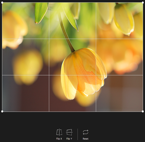
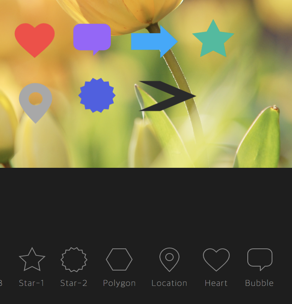
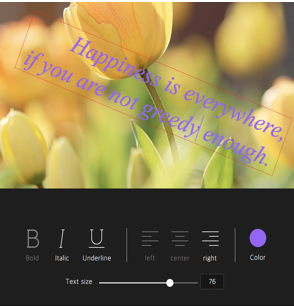
- Crop, Flip, Rotation, Drawing, Shape, Icon, Text, Mask Filter, Image Filter
$3
- Download, Image Load, Undo, Redo, Reset, Delete Object(Shape, Line, Mask Image...)
| Crop | Flip | Rotation | Drawing | Shape |
|---|---|---|---|---|
 |  |  |  |  |
| Icon | Text | Mask | Filter | |
 |  |  |  |
$3
- Grayscale, Invert, Sepia, Blur Sharpen, Emboss, RemoveWhite, GradientTransparency, Brightness, Noise, Pixelate, ColorFilter, Tint, Multiply, Blend
| Grayscale | Noise | Gradient | Emboss | Pixelate |
| --- | --- | --- | --- | --- |
| !grayscale | !noise | !gradient-transparency | !emboss | !pixelate |
| Sepia | Sepia2 | Blend-righten | Blend-diff | Invert |
| --- | --- | --- | --- | --- |
| !sepia | !sepia2 | !blend-righten | !blend-diff | !invert |
| Multifly | Tint | Brightness | Remove-white | Sharpen |
| --- | --- | --- | --- | --- |
| !multifly | !tint | !brightness | !remove-white | !sharpen |
$3
``javascripot`
var imageEditor = new tui.ImageEditor('#tui-image-editor-container', {
includeUI: {
menu: ['shape', 'crop']
...
},
...
🙆 Easy to apply the size and design you want
$3
- Widely supported in browsers including IE9, which is the minimum requirement to support canvas.
- Option to support various display sizes.
(allows you to use the editor features on your web pages at least over 550 * 450 sizes)
!2018-06-04 5 35 25
$3
- Has a white and black theme, and you can modify the theme file to customize it.
- Has an API so that you can create your own instead of the built-in.
| black - top | black - bottom | white - left | white - right |
| --- | --- | --- | --- |
| !2018-06-05 1 41 13 | !2018-06-05 1 40 24 | !2018-06-05 1 41 48 | !2018-06-05 1 42 27 |
🎨 Features
* Load image to canvas
* Undo/Redo (With shortcut)
* Crop
* Flip
* Rotation
* Free drawing
* Line drawing
* Shape
* Icon
* Text
* Mask Filter
* Image Filter
💾 Install
The TOAST UI products can be installed by using the package manager or downloading the source directly.
However, we highly recommend using the package manager.
$3
You can find TOAST UI producs via npm and bower package managers.
Install by using the commands provided by each package manager.
When using npm, be sure Node.js is installed in the environment.
#### npm
`sh`
$ npm install --save tui-image-editor # Latest version
$ npm install --save tui-image-editor@
#### bower
`sh`
$ bower install tui-image-editor # Latest version
$ bower install tui-image-editor#
$3
TOAST UI products are available over the CDN powered by TOAST Cloud.
You can use the CDN as below.
`html`
If you want to use a specific version, use the tag name instead of latest in the URL.
The CDN directory has the following structure.
`
tui-image-editor/
├─ latest/
│  ├─ tui-image-editor.js
│  ├─ tui-image-editor.min.js
│  └─ tui-image-editor.css
├─ v3.1.0/
│  ├─ ...
$3
* Download bundle files from dist
folder* Download all sources for each version
🔨 Usage
$3
Add the container element where TOAST UI ImageEditor will be created.
` html`
...
...
$3
Add dependencies & initialize ImageEditor class with given element to make an image editor.
`javascript`
var ImageEditor = require('tui-image-editor');
var blackTheme = require('./js/theme/black-theme.js');
var instance = new ImageEditor(document.querySelector('#tui-image-editor'), {
includeUI: {
loadImage: {
path: 'img/sampleImage.jpg',
name: 'SampleImage'
},
theme: blackTheme, // or whiteTheme
initMenu: 'filter',
menuBarPosition: 'bottom'
},
cssMaxWidth: 700,
cssMaxHeight: 500,
selectionStyle: {
cornerSize: 20,
rotatingPointOffset: 70
}
});
Or ~ UI
`javascript`
var ImageEditor = require('tui-image-editor');
var instance = new ImageEditor(document.querySelector('#tui-image-editor'), {
cssMaxWidth: 700,
cssMaxHeight: 500,
selectionStyle: {
cornerSize: 20,
rotatingPointOffset: 70
}
});
See details for additional informations.
🔧 Development
The TOAST UI products are open-source.
After fixing issues, create a pull request(PR).
Run npm scripts and develop with the following process.
$3
Fork master branch into your personal repository.
Clone to local computer.
Install node modules.
Before starting development, check for any errors.
`sh`
$ git clone https://github.com/{username}/tui.image-editor.git
$ cd tui.image-editor
$ npm install
$ npm run test
$3
`sh``
$ npm run serve
📙 Documents
* Tutorial : https://github.com/nhnent/tui.image-editor/tree/master/docs
* Example : http://nhnent.github.io/tui.image-editor/latest/tutorial-example01-includeUi.html
* API : http://nhnent.github.io/tui.image-editor/latest/
💬 Contributing
* Code of Conduct
* Contributing guideline
* Issue guideline
* Commit convention
🔩 Dependency
* fabric.js >=1.6.7
* tui.code-snippet >=1.3.0
* tui.color-picker >=2.2.0
🍞 TOAST UI Family
* TOAST UI Editor
* TOAST UI Grid
* TOAST UI Chart
* TOAST UI Calendar
* TOAST UI Components
📜 License
MIT LICENSE