unleash
v2.0.2
Unleash your code into the wild yonder
75/weekUpdated 2 months agoApache-2.0Unpacked: 131.8 KB
Published by James Womack
npm install unleashProfessionally publish your JavaScript modules in one keystroke
$3
* Updates your version according to semantic versioning
* Runs your tests or any other prepublish scripts you've defined in package.json
* Updates your changelog according to the conventional changelog spec
* Publishes your module to NPM (optionally turned off via
--no-publish)* Pushes your code and tags to git (optionally turned off via
--no-push)* Supports changelog links for both Github & Bitbucket Enterprise (formerly Stash)
* Automatically recovers from errors by safely resetting to the git state prior to running unleash
* Features a "dry run" mode for most commands that will allow you to preview what change unleash will make before it makes them
* Allows you to preview what files will and won't be published to NPM (
--list-publishables)* Works w/ Node versions all the way back to 4.8.5
$3
* Unleash eats its own dogfood. Unleash is used to release itself
* Unleash eliminates common time-wasting / colleague-confusing mistakes such as forgetting to tag your releases, update your changelog or forgetting to publish your module)
* Unleash encourages use of software comprehension conventions such as the CHANGELOG by making it dead easy
* Unleash encourages you to make git commit messages that make sense to everyone in your organization
* Unleash is constructed from battle-tested and well-understood open source modules such as npm, vinyl-fs, yargs, chalk & semver. Additionally, the architecture of Unleash is partially based on Gulp
* Unleash uses the Angular Conventional Changelog manner of using git commit conventions
* Unleash takes inter-organizational compatibility seriously—most any version of Node being used by a team will work with Unleash
$3
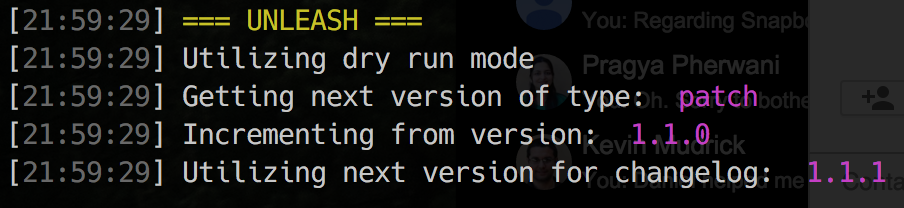
#### Execute a Dry Run of Publishing a Patch Release
``
unleash -p -d
OR...
unleash --patch --dry-run
#### Execute a Patch Release
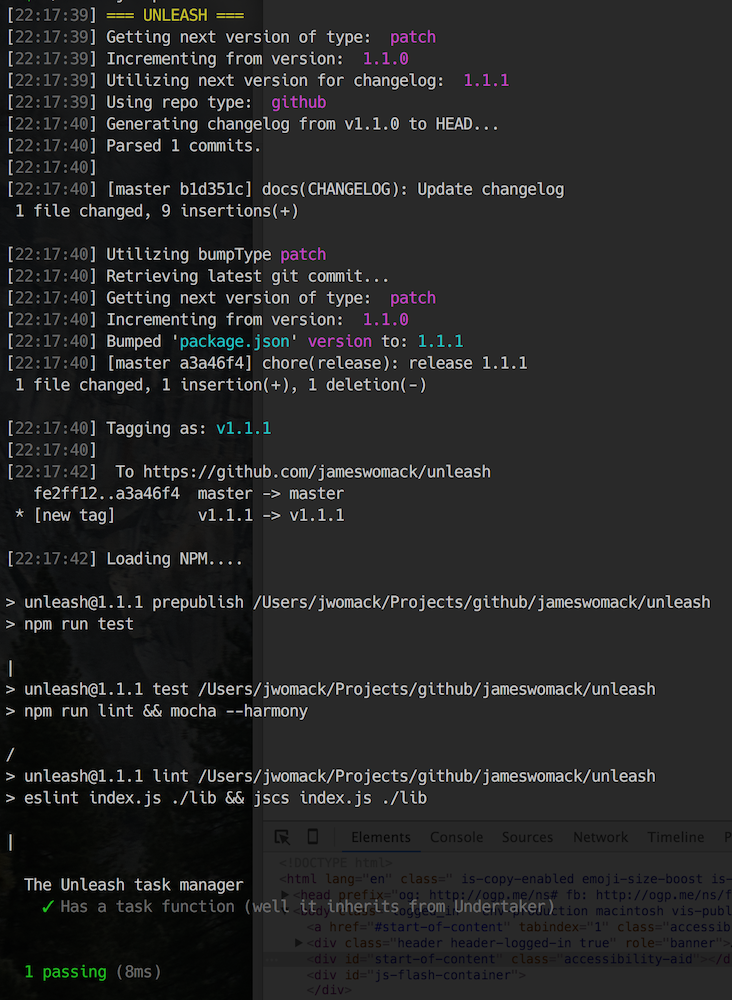
unleash -p
OR...
unleash --patch
#### Execute a Major Release
unleash -M
OR...
unleash --major
#### Execute a Major Package Version Increment w/o Publishing to NPM
unleash -M --no-publish
#### Execute a Major NPM Release w/o Pushing to git
unleash -M --no-push
#### Execute a Minor Release to a Bitbucket Enterprise Repository
unleash -m -r bitbucket
OR...
unleash --minor --repo-type bitbucket
#### View which files will be published to NPM
This can be helpful in ensuring your package is being published with the least
amount of files possible, while also ensuring you have all the files you need.
We use this to eliminate files like .eslintrc and .tern-project.
unleash -ls
OR...
unleash --list-publishables
#### Publish your project's documentation to Github Pages
Manually leveraging Github's Pages feature can be tedious. You need to maintain
a branch that's orphaned from master and yet is based on assets and/or tasks
from master. Unleash can help by allowing you to publish files matching a quoted
glob string to gh-pages from the comfort of the branch you normally work on.
unleash --gh
defaults to "./docs/*/"
OR...
unleash --ghpages-deploy --ghpages-path "./public/*/"
$3
perf(pencil): remove graphiteWidth option
fix(graphite): stop graphite breaking when width < 0.1
feat(pencil): add 'graphiteWidth' option
$3
Global w/ latest stable release
npm i unleash -g
OR...
Locally saved w/ exact version
npm i unleash -DE
$3
* Major -M | --major
* E.g. => "3.0.0"
* Minor -m | --minor
* E.g. => "2.7.0"
* Patch -p | --patch
* E.g. => "2.6.5"
* Prerelease -P | --prerelease
* E.g. => "2.6.4-beta.1"`$3
!Travis badge