use-persisted-state-hook
v1.4.0
Resilient state that persist across browser's sessions 📦
0/weekUpdated 3 years agoMITUnpacked: 19.4 KB
Published by Giovanni Benussi
npm install use-persisted-state-hook


Lightweight, resilient persisted useState.
Features:
- 📦 Persist state on localStorage between browser sessions.
- ⚛️ Automatically handle state's shape updates.
- 🔄 Handle stale states when initial state changes.
- ✅ Similar interface to React's official useState hook.
- ✨ Server Side Render Support.
Installation
npm:
``sh`
npm install use-persisted-state-hook
yarn:
`sh`
yarn add use-persisted-state-hook
Detect Changes in Initial State
use-persisted-state-hook is the only library that handles changes in initial state gracefully. Leet's imagine that you have a hook called useLocalStorage like the one provided here. It has the same API that useState and looks like this:
`jsx
function Greet() {
const [visits, setVisits] = useLocalStorage('visits', 0)
// Logic to update visits...
return (
Visits count is {visits}
)
}
`
Now, imagine that you want to update the initial state to it stores more information:
jsx
function Greet() {
  const [visits, setVisits] = useLocalStorage('visits', { today: 0, total: 0 }))  // Logic to update visits...  return (

      Today's count is {visits.today}
      Total count is {visits.total}

  )
}
`The code above works, however, there's a pitfall. A user that
loaded your app after you released the first version, so the value it has stored
for
is 0 (or 1, or 5, or any integer). When they load your app again with the new logic, they'll
see "Today's count is " and "Total count is ".usePersistedState is the only library that handles this case gracefully by
storing an identifier that identifies uniquely the
initial state so, whenever it changes, the state it's going to be reset and
you'd never have to think about this issue in the first place ✨Usage
Simple Example
`jsx
import React from 'react'
import usePersistedState from 'use-persisted-state-hook'function Counter() {
const [count, setCount] = usePersistedState('count', 0)
return (
Count is {count}
)
}export default Counter
`Elaborated Example
Expected output
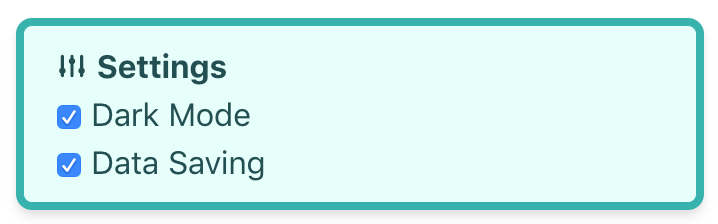
Code (styles ommited):
jsx
import React from 'react'
import usePersistedState from 'use-persisted-state-hook'function Settings() {
const [options, setOptions] = usePersistedState('options', [
{ title: 'Dark Mode', name: 'dark_mode', enabled: true },
{ title: 'Data Saving 2', name: 'data_saving', enabled: true },
])
const onClick = (e) => {
setOptions(
options.map((option) =>
option.name === e.target.name
? { ...option, enabled: !option.enabled }
: option
)
)
}
return (
{options.map((option) => (
))}
)
}
``