vite-plugin-visual-edit
v1.0.6TypeScript
A Vite plugin for visual editing of React components. Highlights elements, shows source locations, and enables in-browser content editing with iframe communication support.
0/weekUpdated 3 weeks agoMITUnpacked: 64.5 KB
Published by Joi
npm install vite-plugin-visual-editvite-plugin-visual-edit
A Vite plugin for visual editing of React components. Highlights elements, shows source locations, and enables in-browser content editing with iframe communication support.
Features
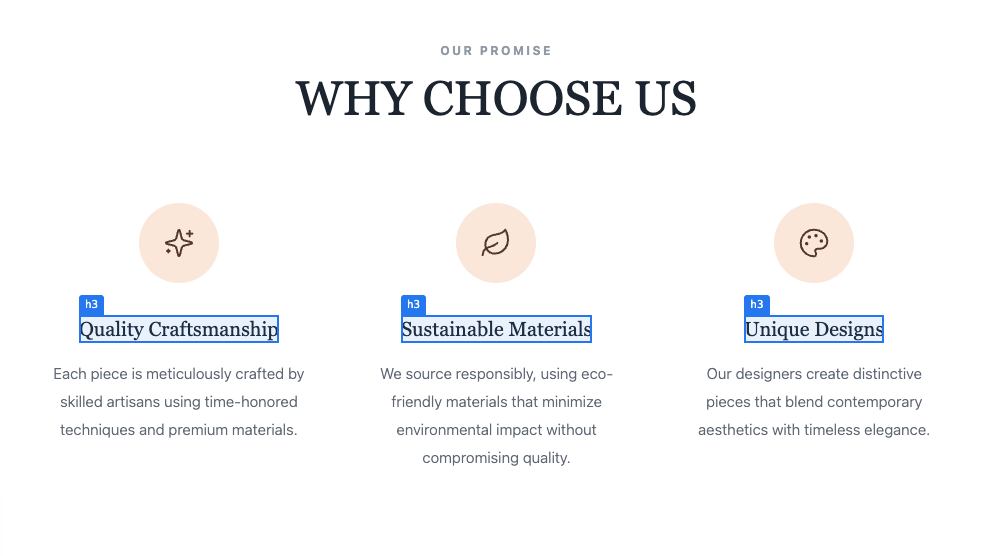
- 🎯 Visual Highlighting - Hover over elements to see blue highlights with tag name labels
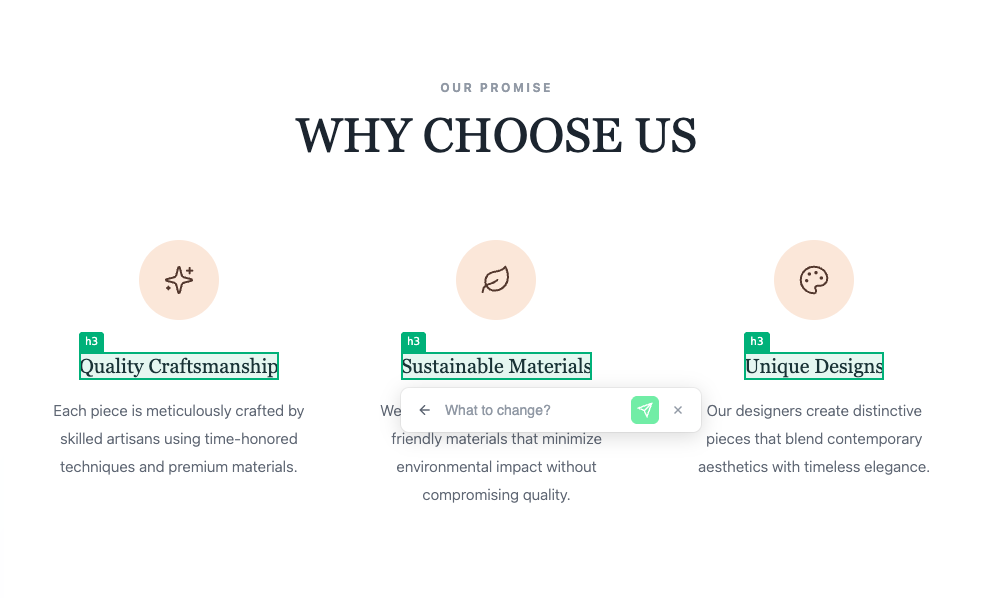
- ✏️ Click to Edit - Click any element to open an inline edit form
- 📍 Source Location Tracking - Automatically adds data-source-location attributes to all JSX elements
- 🔄 Dynamic Content Detection - Detects elements with dynamic content via data-dynamic-content attribute
- 📨 iframe Communication - Perfect for embedding in visual editors with postMessage support
- ⚡ Development Only - Zero overhead in production builds
- 🎨 Fully Configurable - Toggle on/off, keyboard shortcuts, badges, and more
Installation
``bash`
npm install vite-plugin-visual-edit -Dor
yarn add vite-plugin-visual-edit -Dor
pnpm add vite-plugin-visual-edit -D
Quick Start
`typescript
// vite.config.ts
import { defineConfig } from "vite";
import visualEdit from "vite-plugin-visual-edit";
export default defineConfig({
plugins: [...visualEdit()],
});
`
That's it! The plugin works alongside @vitejs/plugin-react to add visual editing capabilities.
Configuration
`typescript
import { defineConfig } from "vite";
import visualEdit from "vite-plugin-visual-edit";
export default defineConfig({
plugins: [
...visualEdit({
// Babel exclude patterns - files matching won't get source attributes
exclude: [/node_modules/, /components\/ui\//],
// Save toggle state to localStorage (default: true)
persistState: true,
// Auto-hide loading after N seconds (default: 10)
submitTimeout: 10,
// Show toggle badge at bottom-right corner (default: false)
showBadge: false,
// Enable Ctrl+Shift+E keyboard shortcut (default: false)
enableKeyboardShortcut: false,
// postMessage type for edit requests (default: 'visual-edit-request')
messageTypeDataRequest: "visual-edit-request",
// postMessage type for responses (default: 'visual-edit-response')
messageTypeDataResponse: "visual-edit-response",
// postMessage type for toggle commands (default: 'visual-edit-toggle')
messageTypeToggle: "visual-edit-toggle",
// Start with editing enabled (default: false)
defaultEnabled: false,
// Customizable colors
colorHover: "#3b82f6", // Hover highlight border color (blue-500)
colorSelected: "#10b981", // Selected element border color (green-500)
colorSubmit: "#10b981", // Submit button color (green-500)
// Customizable attribute names (defaults shown)
attributeSourceLocation: "data-source-location",
attributeDynamicContent: "data-dynamic-content",
// Multi-language support
language: "en", // 'en' | 'ko' | 'vn' | 'jp' | 'ch'
// Custom translations or overrides
translations: {
vn: {
placeholder: "Bạn muốn sửa gì thế?",
},
},
}),
],
});
`
Multi-language Support
The plugin comes with built-in translations for:
- English (en) - Defaultko
- Korean ()vn
- Vietnamese ()jp
- Japanese ()ch
- Chinese ()
You can set the initial language via the language option or change it dynamically.
How It Works
$3
The plugin's Babel transformer adds two attributes to every JSX element:
`html`
Hello World
- data-source-location (configurable via attributeSourceLocation) - Format: path/to/file:line:column
- (configurable via attributeDynamicContent) - "true" if element contains dynamic expressions
$3
The visual editor starts disabled by default. Toggle it using:
#### 1. postMessage (for iframe embedding)
`javascript
// Enable
iframe.contentWindow.postMessage(
{ type: "visual-edit-toggle", enabled: true },
"*"
);
// Disable
iframe.contentWindow.postMessage(
{ type: "visual-edit-toggle", enabled: false },
"*"
);
// Toggle
iframe.contentWindow.postMessage({ type: "visual-edit-toggle" }, "*");
// Change Language
iframe.contentWindow.postMessage(
{
type: "visual-edit-language",
language: "vn", // 'en', 'ko', 'vn', 'jp', 'ch'
},
"*"
);
`
#### 2. JavaScript API
`javascript`
window.__VISUAL_EDIT__.enable();
window.__VISUAL_EDIT__.disable();
window.__VISUAL_EDIT__.toggle();
window.__VISUAL_EDIT__.setLanguage("vn");
window.__VISUAL_EDIT__.isEnabled(); // returns boolean
#### 3. Keyboard Shortcut (if enabled)
- Windows/Linux: Ctrl + Shift + E
- Mac:
$3
When a user submits an edit, a postMessage is sent to the parent window:
`javascript
// Listen for edit requests in parent window
window.addEventListener("message", (event) => {
if (event.data.type === "visual-edit-request") {
const { sourceLocation, content, element } = event.data.data;
console.log("Edit request:", {
sourceLocation, // "components/Header:15:4"
content, // User's input text
element, // "div", "button", etc.
});
// Process the edit...
// Send response to close the form
event.source.postMessage(
{
type: "visual-edit-response",
success: true,
},
"*"
);
// Or send error (keeps form open)
event.source.postMessage(
{
type: "visual-edit-response",
success: false,
error: "Failed to save",
},
"*"
);
}
});
`
$3
`typescript
// Request sent from iframe
interface VisualEditRequestMessage {
type: string; // 'visual-edit-request'
data: {
sourceLocation: string; // "path/to/file:line:column"
content: string; // User's input
element: string | null; // Tag name
};
}
// Response sent to iframe
interface VisualEditResponseMessage {
type: string; // 'visual-edit-response'
success: boolean;
error?: string;
}
// Toggle command
interface VisualEditToggleMessage {
type: string; // 'visual-edit-toggle'
enabled?: boolean; // undefined = toggle
}
// Language command
interface VisualEditLanguageMessage {
type: string; // 'visual-edit-language'
language: "en" | "ko" | "vn" | "jp" | "ch";
}
`
Global API
The plugin exposes a global API on window.__VISUAL_EDIT__:
`typescript`
interface VisualEditAPI {
enable(): void;
disable(): void;
toggle(): void;
setLanguage(lang: string): void;
isEnabled(): boolean;
config: VisualEditConfig;
}
Browser Support
- Chrome 80+
- Firefox 75+
- Safari 14+
- Edge 80+
TypeScript
Full TypeScript support with exported types:
`typescript``
import type {
VisualEditOptions,
VisualEditConfig,
VisualEditRequestData,
VisualEditRequestMessage,
VisualEditResponseMessage,
VisualEditToggleMessage,
VisualEditAPI,
} from "vite-plugin-visual-edit";
License
MIT
Contributing
Contributions are welcome! Please open an issue or submit a pull request.