vue-stepper
v1.4.2
Vue Stepper
0/weekUpdated 3 years agoMITUnpacked: 104.2 KB
Published by PygmySlowLoris Team
npm install vue-stepperStepper 
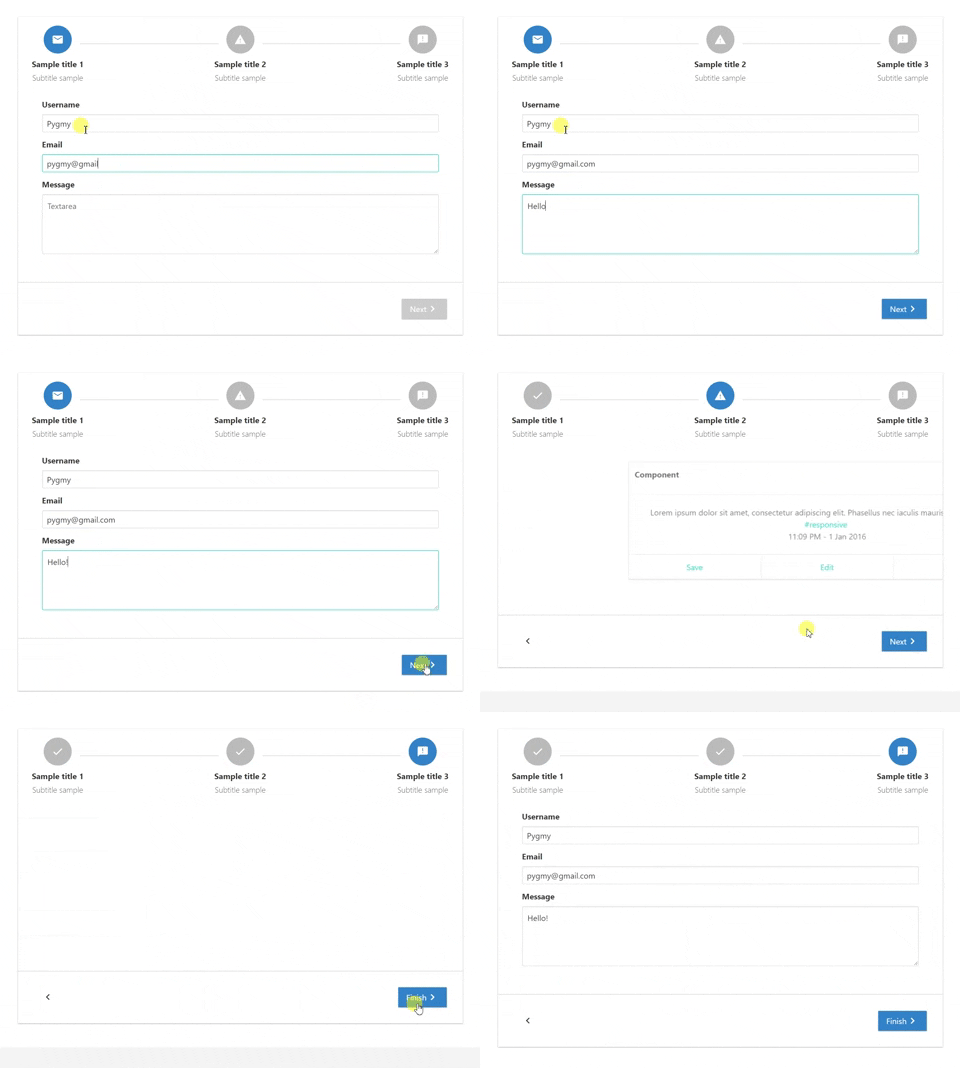
Stepper for Vue.
A simple stepper with simple actions such as next, back and finish to perform simple forms.
Installation
``
npm install vue-stepper --save
Properties
| Properties | Type | Values |
| :--------------- | :------- | :--------- |
| steps | Array of Objects | Each object is a step that will be included in the stepper |locale
| | String | Default: en. Current options: en, es, pt, ja, he, cn, ru , ar. |top-buttons
| | Boolean | Default: false. If true buttons on the header, at the start and the end of the steps, will be shown for better user experience. |keep-alive
| | Boolean | Default: true. If true step components won't be destroy in each step change, bue if false they will. |reset
| | Boolean | Default: false. If true the steps will be reset |
$3
| Properties | Type | Values |
| :--------------- | :------- | :--------- |
| icon | String | Ex.: mail. Name of icons that belong to material-icons library |name
| | String | Name of the step. Each step name MUST be unique |title
| | String | Title that will be displayed below the step, on bold. |subtitle
| | String | Subtitle displayed below the title. |component
| | Component | Imported component that will be show on the content area of the step. |completed
| | Boolean | If step is completed or not. If TRUE a done material icon will replace the one given before. Only mark as completed when you want to let know the user that the previous step has been completed |
Events emitted by stepper
| Event name | When |
| :--------------- | :------- |
| completed-step | Triggered when a step is completed. Completed meaning that current step has been left behind on the step list. Now you can mark your step object as completed if you desire it.|active-step
| | Current active step. It's name and index are exposed on the deployed payload.| stepper-finished
| | Event emitted when the user clicks the final button. Now it's time to execute a final callback method|clicking-back
| | Triggered when user clicks the back button to return to a previous step|reset
| | Triggered when the steps have been reset. So now it's pointing to the first step with cleared fields|
Events that can be emitted by content component
| Event name | When |
| :--------------- | :------- |
| can-continue | By default the next button will be disabled until the event can-continue is triggered with an object containing the property value. Value accepts a boolean, if true next/finish button will be enabled if false disabled. On each next step canContinue variable will be set to false.|change-next
| | With this event you can change de state of the clickedNext prop that each step has. Just emit it with the following payload {nextBtnValue: boolean} |
Exposed props for step component
| Properties | Type | Values |
| :--------------- | :------- | :--------- |
| currentStep
| Object | Exposes current step for step component | Examples
Template example
`html
>
`Script example
javascript    import HorizontalStepper from 'vue-stepper';    // This components will have the content for each stepper step.
    import StepOne from './StepOne.vue';
    import StepTwo from './StepTwo.vue';    export default {
        components: {
            HorizontalStepper
        },
        data(){
            return {
                demoSteps: [
                    {
                        icon: 'mail',
                        name: 'first',
                        title: 'Sample title 1',
                        subtitle: 'Subtitle sample',
                        component: StepOne,
                        completed: false                    },
                    {
                        icon: 'report_problem',
                        name: 'second',
                        title: 'Sample title 2',
                        subtitle: 'Subtitle sample',
                        component: StepTwo,
                        completed: false
                    }
                ]
            }
        },
        methods: {
            // Executed when @completed-step event is triggered
            completeStep(payload) {
                this.demoSteps.forEach((step) => {
                    if (step.name === payload.name) {
                        step.completed = true;
                    }
                })
            },
            // Executed when @active-step event is triggered
            isStepActive(payload) {
                this.demoSteps.forEach((step) => {
                    if (step.name === payload.name) {
                        if(step.completed === true) {
                            step.completed = false;
                        }
                    }
                })
            },
            // Executed when @stepper-finished event is triggered
            alert(payload) {
                alert('end')
            }
        }
    }
`Example of component content that will be displayed on the first step (vuelidate used to validate form).
Template
html
v-model="form.username">
This username is invalid
This email is invalid
`Javascript
javascript    import {validationMixin} from 'vuelidate'
    import {required, email} from 'vuelidate/lib/validators'    export default {
        props: ['clickedNext', 'currentStep'],
        mixins: [validationMixin],
        data() {
            return {
                form: {
                    username: '',
                    demoEmail: '',
                    message: ''
                }
            }
        },
        validations: {
            form: {
                username: {
                    required
                },
                demoEmail: {
                    required,
                    email
                },
                message: {
                    required
                }
            }
        },
        watch: {
            $v: {
                handler: function (val) {
                    if(!val.$invalid) {
                        this.$emit('can-continue', {value: true});
                    } else {
                        this.$emit('can-continue', {value: false});
                    }
                },
                deep: true
            },
            clickedNext(val) {
                if(val === true) {
                    this.$v.form.$touch();
                }
            }
        },
        mounted() {
            if(!this.$v.$invalid) {
                this.$emit('can-continue', {value: true});
            } else {
                this.$emit('can-continue', {value: false});
            }
        }
    }
``