zelikov-tui-image-editor
v3.5.4
TOAST UI Component: ImageEditor
0/weekUpdated 3 years agoMITUnpacked: 3.6 MB
Published by NHN FE Development Lab
npm install zelikov-tui-image-editor!Toast UI ImageEditor
> Full featured image editor using HTML5 Canvas. It's easy to use and provides powerful filters.
    
Wrappers
- toast-ui.vue-image-editor: Vue wrapper component is powered by NHN.
- toast-ui.react-image-editor: React wrapper component is powered by NHN.
!6 -20-2018 17-45-54
🚩 Table of Contents
* Collect statistics on the use of open source
* Browser Support
* Has full features that stick to the basic.
* Photo manipulation
* Integration function
* Powerful filter function
* Select only the desired function
* Easy to apply the size and design you want
* Can be used everywhere
* Nice default & Fully customizable Themes
* Features
* Install
* Via Package Manager
* Via Contents Delivery Network (CDN)
* Download Source Files
* Usage
* HTML
* JavaScript
* Development
* Setup
* Run webpack-dev-server
* Documents
* Contributing
* Dependency
* TOAST UI Family
* Used By
* License
Collect statistics on the use of open source
TOAST UI ImageEditor applies Google Analytics (GA) to collect statistics on the use of open source, in order to identify how widely TOAST UI ImageEditor is used throughout the world. It also serves as important index to determine the future course of projects. location.hostname (e.g. > “ui.toast.com") is to be collected and the sole purpose is nothing but to measure statistics on the usage. To disable GA, use the following
usageStatistics option when creating the instance.
``
js

var options = {

    //...

    usageStatistics: false

}


var imageEditor = new tui.ImageEditor('#tui-image-editor-container', options);
`
Or, include tui-code-snippet(v1.4.0 or later) and then immediately write the options as follows:
`js
tui.usageStatistics = false;
`
🌏 Browser Support
|  Chrome |
  Internet Explorer |
  Edge |
  Safari |
  Firefox |
| :---------: | :---------: | :---------: | :---------: | :---------: |
| Yes | 9+ | Yes | Yes | Yes |
💪 Has full features that stick to the basic.
$3
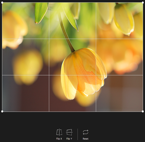
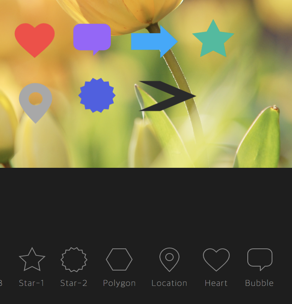
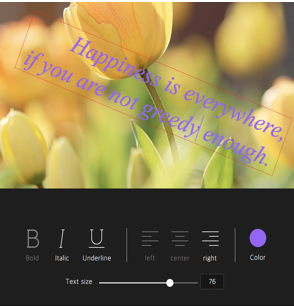
- Crop, Flip, Rotation, Drawing, Shape, Icon, Text, Mask Filter, Image Filter
$3
- Download, Image Load, Undo, Redo, Reset, Delete Object(Shape, Line, Mask Image...)
Crop
Flip
Rotation
Drawing
Shape



Icon
Text
Mask
Filter


$3
- Grayscale, Invert, Sepia, Blur Sharpen, Emboss, RemoveWhite, GradientTransparency, Brightness, Noise, Pixelate, ColorFilter, Tint, Multiply, Blend
| Grayscale | Noise | Gradient | Emboss | Pixelate |
| --- | --- | --- | --- | --- |
| !grayscale | !noise | !gradient-transparency | !emboss | !pixelate |
| Sepia | Sepia2 | Blend-righten | Blend-diff | Invert |
| --- | --- | --- | --- | --- |
| !sepia | !sepia2 | !blend-righten | !blend-diff | !invert |
| Multifly | Tint | Brightness | Remove-white | Sharpen |
| --- | --- | --- | --- | --- |
| !multifly | !tint | !brightness | !remove-white | !sharpen |
$3
`javascripot
var imageEditor = new tui.ImageEditor('#tui-image-editor-container', {
includeUI: {
menu: ['shape', 'crop']
...
},
...
`
🙆 Easy to apply the size and design you want


$3

  - Widely supported in browsers including IE9, which is the minimum requirement to support canvas.

  - Option to support various display sizes.

    (allows you to use the editor features on your web pages at least over 550 * 450 sizes)


    !2018-06-04 5 35 25


$3

  - Has a white and black theme, and you can modify the theme file to customize it.

  - Has an API so that you can create your own instead of the built-in.


| black - top | black - bottom |  white - left | white - right |

| --- | --- | --- | --- |

| !2018-06-05 1 41 13 | !2018-06-05 1 40 24 | !2018-06-05 1 41 48 | !2018-06-05 1 42 27 |


🎨 Features

* Load image to canvas

* Undo/Redo (With shortcut)

* Crop

* Flip

* Rotation

* Free drawing

* Line drawing

* Shape

* Icon

* Text

* Mask Filter

* Image Filter


💾 Install


The TOAST UI products can be installed by using the package manager or downloading the source directly.

However, we highly recommend using the package manager.


$3


You can find TOAST UI producs via npm and bower package managers.

Install by using the commands provided by each package manager.

When using npm, be sure Node.js is installed in the environment.


#### npm


#### 1. ImageEditor installation
`sh
$ npm install --save tui-image-editor # Latest version
$ npm install --save tui-image-editor@ # Specific version
`
##### 2. fabric.js installation
And you should add postInstall script to your package.json.
_This process will be removed when fabric.js updated to v2.7.0 and bundled with TOAST UI ImageEditor together._
`js
{
// ...
"scripts": {
// ...
"postInstall": "npm install --no-save --no-optional fabric@^1.6.7"
}
// ...
}
`
Or you can add fabric as dependency. But there is some steps to be installed well.
#### bower
`sh
$ bower install tui-image-editor # Latest version
$ bower install tui-image-editor# # Specific version
`
$3

TOAST UI products are available over the CDN powered by TOAST Cloud.


You can use the CDN as below.
`html
`
If you want to use a specific version, use the tag name instead of latest in the URL.
The CDN directory has the following structure.
`
tui-image-editor/

├─ latest/

│  ├─ tui-image-editor.js

│  ├─ tui-image-editor.min.js

│  └─ tui-image-editor.css

├─ v3.1.0/

│  ├─ ...
`
$3

* Download bundle files from
dist folder
* Download all sources for each version
🔨 Usage
$3
Add the container element where TOAST UI ImageEditor will be created.
` html
...
...
`
$3


Add dependencies & initialize ImageEditor class with given element to make an image editor.
`javascript
var ImageEditor = require('tui-image-editor');
var blackTheme = require('./js/theme/black-theme.js');
var locale_ru_RU = { // override default English locale to your custom
'Crop': 'Обзрезать',
'Delete-all': 'Удалить всё'
// etc...
};
var instance = new ImageEditor(document.querySelector('#tui-image-editor'), {
includeUI: {
loadImage: {
path: 'img/sampleImage.jpg',
name: 'SampleImage'
},
locale: locale_ru_RU,
theme: blackTheme, // or whiteTheme
initMenu: 'filter',
menuBarPosition: 'bottom'
},
cssMaxWidth: 700,
cssMaxHeight: 500,
selectionStyle: {
cornerSize: 20,
rotatingPointOffset: 70
}
});
`
Or ~ UI
`javascript
var ImageEditor = require('tui-image-editor');
var instance = new ImageEditor(document.querySelector('#tui-image-editor'), {
cssMaxWidth: 700,
cssMaxHeight: 500,
selectionStyle: {
cornerSize: 20,
rotatingPointOffset: 70
}
});
`
$3

If you using TypeScript, You must
import module = require('module') on importing.
export = and import = require()
`typescript
import ImageEditor = require('tui-image-editor');
const instance = new ImageEditor(document.querySelector('#tui-image-editor'), {
cssMaxWidth: 700,
cssMaxHeight: 500,
selectionStyle: {
cornerSize: 20,
rotatingPointOffset: 70
}
});
`
See details for additional informations.


🔧 Development


The TOAST UI products are open-source.

After fixing issues, create a pull request(PR).

Run npm scripts and develop with the following process.


$3


Fork
master branch into your personal repository.
Clone to local computer.
Install node modules.
Before starting development, check for any errors.
`sh
$ git clone https://github.com/{username}/tui.image-editor.git
$ cd tui.image-editor
$ npm install
$ npm run test
`
$3
`sh
$ npm run serve
``
📙 Documents
* Tutorial : https://github.com/nhn/tui.image-editor/tree/master/docs
* Example : http://nhn.github.io/tui.image-editor/latest/tutorial-example01-includeUi
* API : http://nhn.github.io/tui.image-editor/latest
💬 Contributing
* Code of Conduct
* Contributing guideline
* Issue guideline
* Commit convention
🔩 Dependency
* fabric.js >=1.6.7 && < 2.0.0
* tui.code-snippet >=1.3.0
* tui.color-picker >=2.2.0
🍞 TOAST UI Family
* TOAST UI Editor
* TOAST UI Grid
* TOAST UI Chart
* TOAST UI Calendar
* TOAST UI Components
🚀 Used By
* TOAST Dooray! - Collaboration Service (Project, Messenger, Mail, Calendar, Drive, Wiki, Contacts)
📜 License
MIT LICENSE