@_sh/strapi-plugin-ckeditor
v7.0.0
Integrates CKEditor 5 into your Strapi project as a fully customizable custom field. (Community Edition)
0/weekUpdated 2 weeks agoMITUnpacked: 169.5 KB
Published by nshenderov
npm install @_sh/strapi-plugin-ckeditor
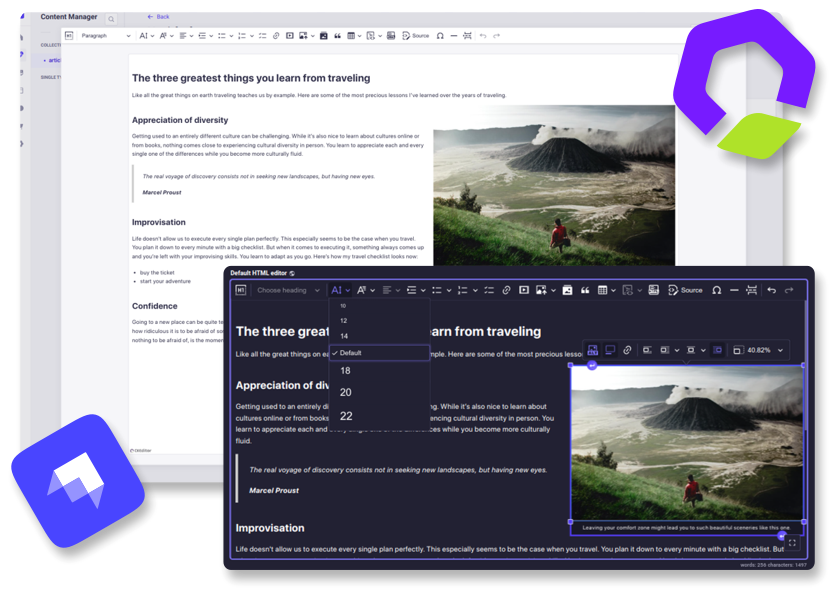
Strapi ➕ CKEditor
Integrates CKEditor 5 into your Strapi project as a fully customizable custom field. (Community edition)
👋 Get Started
- Features
- Installation
- Usage
- Configuration
- Contributing
- Migration
- Requirements
✨ Features
- Extensive configuration
- Media Library integration
- Dark theme support
- Fullscreen expansion
- Responsive images support
- Automatic UI translations
- i18n support
- Self-Hosted

🔧 Installation
Strapi v5:
Add the package to your Strapi application:
``bash`
yarn add @_sh/strapi-plugin-ckeditor
Then, build the app:
`bash`
yarn build
Strapi v4:
Version 3 of the plugin will remain available for Strapi v4 until March 2026.
Refer to the v3 installation guide
for setup instructions.
> Note: Version 3 receives only essential bug fixes. The configuration process and available
> features in version 3 differ significantly from the latest plugin versions.
✍️ Usage
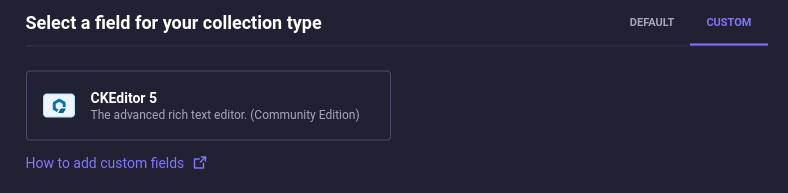
The field can be found in the Content-Type Builder under the CUSTOM tab:
Presets
A preset is a set of settings that define the editor's features and appearance. You
can specify a dedicated preset for each field. The available presets can be customized through the
configuration.
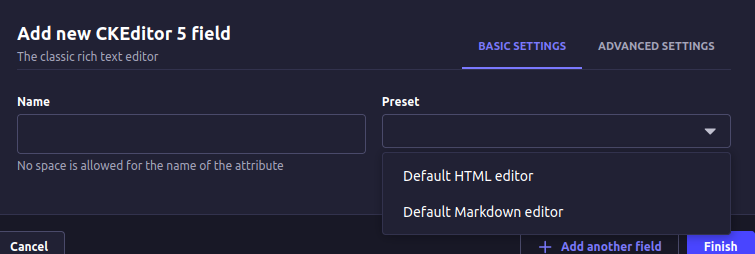
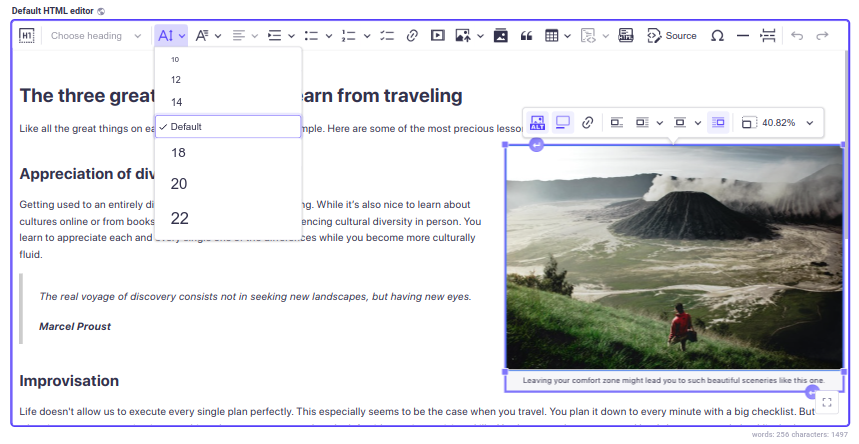
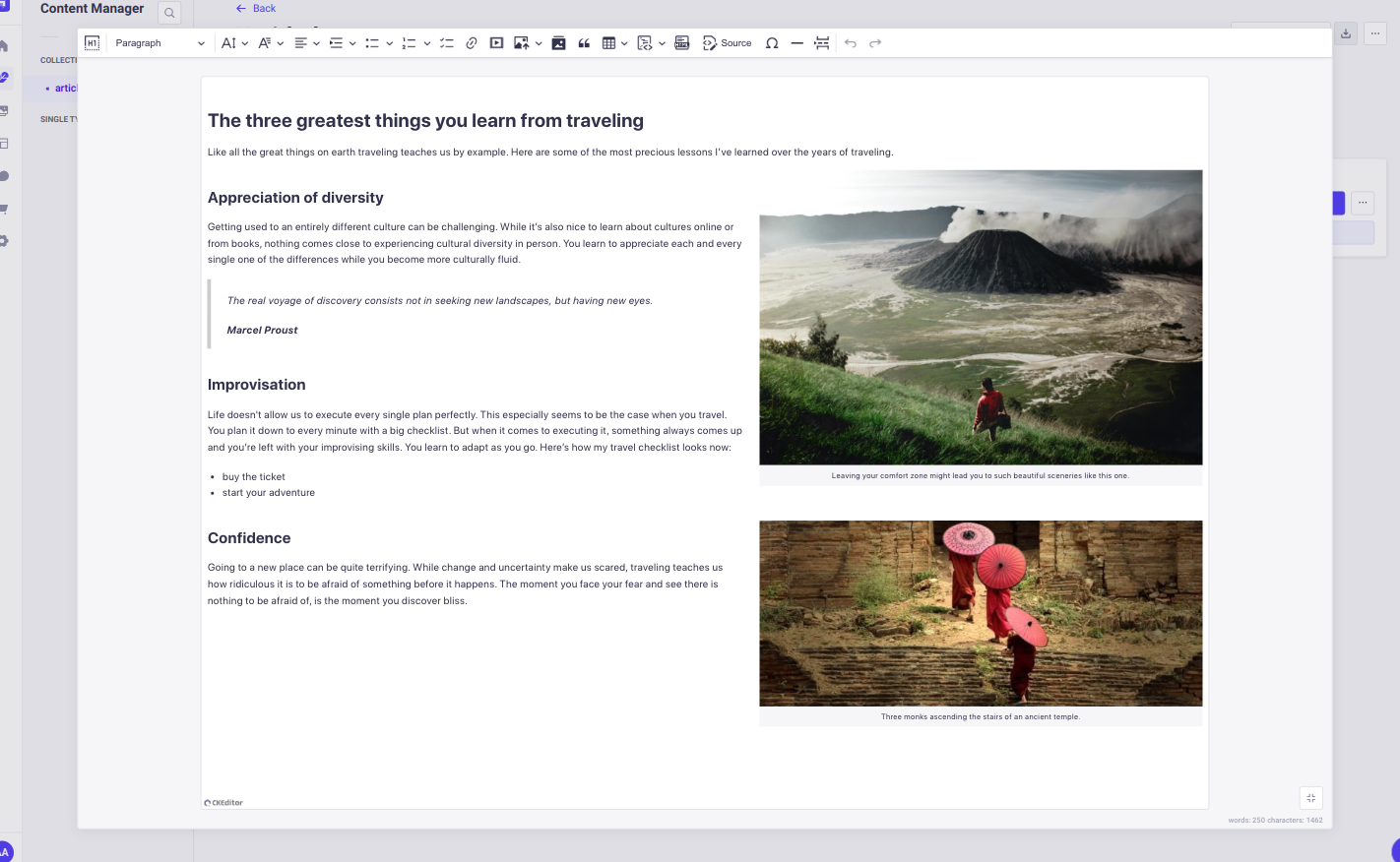
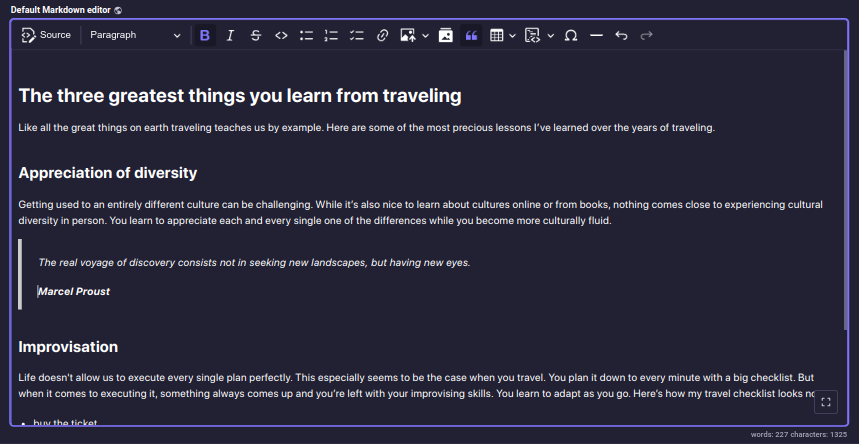
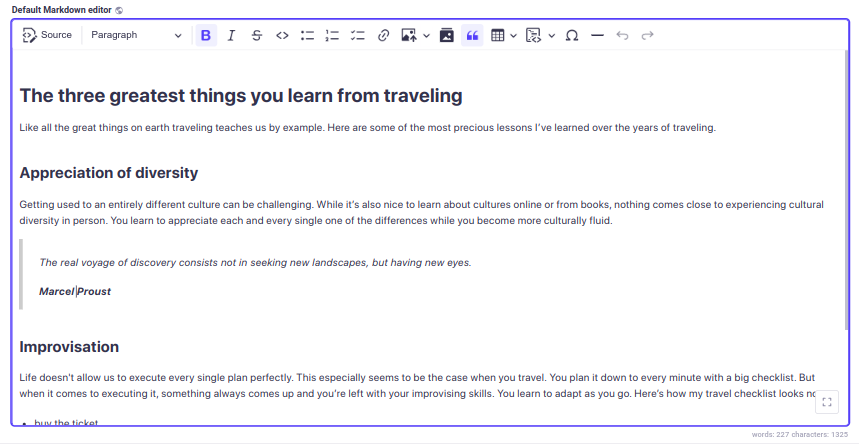
The plugin provides two presets out of the box: Default HTML editor and Default Markdown editor,
each has different output format: HTML and Markdown, respectively. Both presets include
an extensive set of non-premium CKEditor plugins.
Default HTML editor:
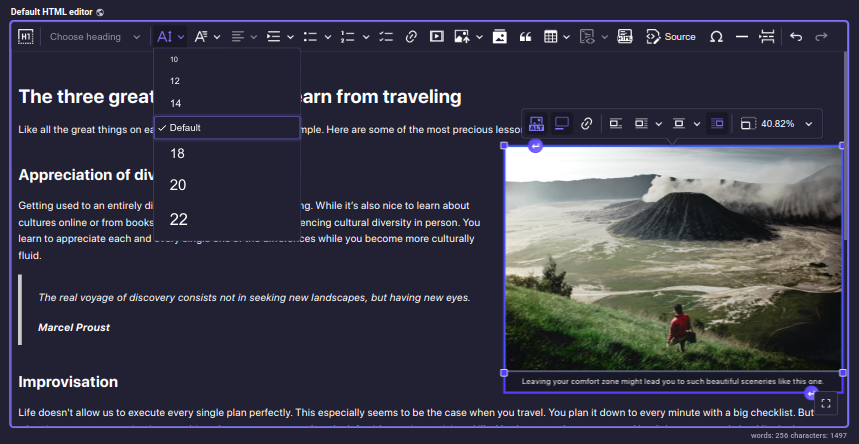
Default Markdown editor:
Responsive images
The plugin generates srcset attribute for inserted images if the image has any formats other than thumbnail.
UI language: If you don't specify the UI language in the editor configuration, the plugin will
default to the Strapi admin's preferred language. If no preference is set, English will be used as a fallback.
Content language: i18n for the editor's content language can be enabled by checking the
Enable localization for this field option in the Advanced Settings tab.
> 💡 It is important to use the content styles on the publishing side of your application. Otherwise, the content will look different in the editor and for your end users. Follow the documentation.
> To display content from external sources, such as images or videos, in your admin panel,
> you need to configure your middlewares.js file.
> Check the documentation for details.
⚙️ Configuration
The plugin configuration must be defined on the front-end.
The plugin provides a set of functions that allow you to modify the plugin's configuration:
`ts`
setPluginConfig(config);
getPluginPresets();
getPluginTheme();
setPluginConfig
The function, accepts a plugin configuration (PluginConfig) that can include an array of presets
and a theme object:
`ts
import { setPluginConfig } from '@_sh/strapi-plugin-ckeditor';
function setPluginConfig(pluginConfig: {
presets: Preset[] | undefined;
theme: Theme | undefined;
}): void;
`
Key points:
- The function must be invoked before the admin panel's bootstrap lifecycle function. The general recommendation is to call it inside the admin panel's register lifecycle function.
- Provided properties will overwrite the default configuration values.
- The configuration becomes immutable after the first invocation, preventing further modifications.
Plugin configuration object includes optional presets and theme properties:
`ts`
type PluginConfig = {
/**
* Presets are sets of settings that define the editor's features and appearance.
*/
presets?: Preset[];
/**
* Styles applied globally to every editor instance.
*/
theme?: Theme;
};
presets is an array of objects of type Preset. Each preset includes the following properties:
`ts`
type Preset = {
/**
* Preset name, displayed in the schema.
*/
name: string;
/**
* Preset description, displayed in the Content-Type Builder.
*/
description: string;
/**
* CKEditor configuration object.
*
* @see {@link https://ckeditor.com/docs/ckeditor5/latest/getting-started/setup/configuration.html | CKEditor documentation}
*/
editorConfig: EditorConfig;
/**
* Additional styles applied to the editor instance after the theme styles.
*/
styles?: EditorStyles;
};
theme object defines a plugin CSS styles applied to every editor instance. It includes the
following properties:
`tscommon
/**
* The styles are applied first, followed by light or dark stylesadditional
* according to user preferences, and finally styles.`
*/
type Theme = {
/**
* Core styles.
*/
common?: EditorStyles;
/**
* Styles applied in light mode.
*/
light?: EditorStyles;
/**
* Styles applied in dark mode.
*/
dark?: EditorStyles;
/**
* Additional styles that complement the theme.
*/
additional?: EditorStyles;
};
`ts`
/**
* Represents styles that can be applied to an editor instance.
* Can be a plain CSS string or an array of interpolations for dynamic styling.
*/
export type EditorStyles = string | Interpolation
getPluginPresets
`ts`
function getPluginPresets(): {
[key: string]: Preset;
};
Returns presets object.
- Each property name must match the corresponding preset's name.
- To extend or modify the options visible in the admin panel's content manager,
changes must be made before the admin panel's bootstrap lifecycle function.
getPluginTheme
`ts`
function getPluginTheme(): Theme;
Returns theme object.
Default presets and theme
To simplify the process of defining a new preset, the plugin exports default presets and
a default theme, which can be used as a base in custom configurations:
`ts`
import {
defaultTheme,
defaultHtmlPreset,
defaultMarkdownPreset,
} from '@_sh/strapi-plugin-ckeditor';
Integration with Strapi's Media Library
To integrate CKEditor with the Strapi's Media Library, the plugin provides two CKEditor plugins
that can be included in your presets without additional configuration:
`ts`
import { StrapiMediaLib, StrapiUploadAdapter } from '@_sh/strapi-plugin-ckeditor';
Available type definitions
The following type definitions are available for use:
`ts`
import type {
PluginConfig,
Preset,
EditorConfig,
Theme,
EditorStyles,
} from '@_sh/strapi-plugin-ckeditor';
Type definitions
`ts`
/**
* Plugin configuration object.
*/
export type PluginConfig = {
/**
* Presets are sets of settings that define the editor's features and appearance.
*/
presets?: Preset[];
/**
* Styles applied globally to every editor instance.
*/
theme?: Theme;
};
`ts`
/**
* Preset is a set of settings that define the editor's features and appearance.
*/
export type Preset = {
/**
* Preset name, displayed in the schema.
*/
name: string;
/**
* Preset description, displayed in the Content-Type Builder.
*/
description: string;
/**
* Additional styles applied to the editor instance after the theme styles.
*/
styles?: EditorStyles;
/**
* CKEditor configuration object.
*
* @see {@link https://ckeditor.com/docs/ckeditor5/latest/getting-started/setup/configuration.html | CKEditor documentation}
*/
editorConfig: EditorConfig;
};
`ts`
/**
* CKEditor configuration object.
*
* @see {@link https://ckeditor.com/docs/ckeditor5/latest/getting-started/setup/configuration.html | CKEditor documentation}
*/
export type EditorConfig = CKE5EditorConfig;
`tscommon
/**
* Styles applied globally to every editor instance.
*
* @remarks
*
* The styles are applied first, followed by light or dark stylesadditional
* according to the preferences, and finally styles.`
*/
export type Theme = {
/**
* Core styles.
*/
common?: EditorStyles;
/**
* Styles applied in light mode.
*/
light?: EditorStyles;
/**
* Styles applied in dark mode.
*/
dark?: EditorStyles;
/**
* Additional styles that complement the theme.
*/
additional?: EditorStyles;
};
`ts`
/**
* Represents styles that can be applied to an editor instance.
* Can be a plain CSS string or an array of interpolations for dynamic styling.
*/
export type EditorStyles = string | Interpolation
$3
Setting a new set of presets [JS]
`js
// src/admin/app.js
import {
Bold,
Italic,
Essentials,
Heading,
Image,
ImageCaption,
ImageStyle,
ImageToolbar,
ImageUpload,
Link,
List,
Paragraph,
} from 'ckeditor5';
import { setPluginConfig, StrapiMediaLib, StrapiUploadAdapter } from '@_sh/strapi-plugin-ckeditor';
const myCustomPreset = {
name: 'myCustomPreset',
description: 'myCustomPreset description',
editorConfig: {
licenseKey: 'GPL',
plugins: [
Bold,
Italic,
Essentials,
Heading,
Image,
ImageCaption,
ImageStyle,
ImageToolbar,
ImageUpload,
Link,
List,
Paragraph,
StrapiMediaLib,
StrapiUploadAdapter,
],
toolbar: [
'heading',
'|',
'bold',
'italic',
'link',
'bulletedList',
'numberedList',
'|',
'strapiMediaLib',
'|',
'undo',
'redo',
],
},
};
const myConfig = {
/**
* Note: Since the provided presets include only myCustomPreset
   * this configuration will overwrite default presets.
   */
  presets: [myCustomPreset],
};
export default {
register() {
setPluginConfig(myConfig);
},
};
`
Setting a new set of presets [TS]
`ts
// src/admin/app.ts
import {
Bold,
Italic,
Essentials,
Heading,
Image,
ImageCaption,
ImageStyle,
ImageToolbar,
ImageUpload,
Link,
List,
Paragraph,
} from 'ckeditor5';
import {
type PluginConfig,
type Preset,
setPluginConfig,
StrapiMediaLib,
StrapiUploadAdapter,
} from '@_sh/strapi-plugin-ckeditor';
const myCustomPreset: Preset = {
name: 'myCustomPreset',
description: 'myCustomPreset description',
editorConfig: {
licenseKey: 'GPL',
plugins: [
Bold,
Italic,
Essentials,
Heading,
Image,
ImageCaption,
ImageStyle,
ImageToolbar,
ImageUpload,
Link,
List,
Paragraph,
StrapiMediaLib,
StrapiUploadAdapter,
],
toolbar: [
'heading',
'|',
'bold',
'italic',
'link',
'bulletedList',
'numberedList',
'|',
'strapiMediaLib',
'|',
'undo',
'redo',
],
},
};
const myConfig: PluginConfig = {
/**
* Note that since provided presets includes only myCustomPreset
   * this configuration will overwrite default presets.
   */
  presets: [myCustomPreset],
};
export default {
register() {
setPluginConfig(myConfig);
},
};
`
Default presets modification using setPluginConfig [TS]
`ts
// src/admin/app.ts
import { css } from 'styled-components';
import {
type PluginConfig,
type Preset,
setPluginConfig,
defaultHtmlPreset,
defaultMarkdownPreset,
} from '@_sh/strapi-plugin-ckeditor';
const defaultHtml: Preset = {
...defaultHtmlPreset,
description: 'Modified default HTML editor',
styles:
.ck {
color: red;
}
,
  editorConfig: {
    ...defaultHtmlPreset.editorConfig,
    placeholder: 'Modified default HTML editor',
    toolbar: [
      'heading',
      '|',
      'bold',
      'italic',
      'link',
      'bulletedList',
      'numberedList',
      '|',
      'strapiMediaLib',
      'insertTable',
      '|',
      'undo',
      'redo',
    ],
  },
};
const defaultMarkdown: Preset = {
...defaultMarkdownPreset,
description: 'Modified default Markdown editor',
styles: css
.ck {
--ck-editor-max-width: 1500px;
--ck-editor-min-height: 700px;
--ck-editor-max-height: 700px;
}
.ck.ck-editor__main {
border: 3px dashed ${({ theme }) => theme.colors.warning500};
}
,
};
const myConfig: PluginConfig = {
presets: [defaultHtml, defaultMarkdown],
};
export default {
register() {
setPluginConfig(myConfig);
},
};
`
Default presets modification using getPluginPresets [TS]
`ts
// src/admin/app.ts
import { css } from 'styled-components';
import { getPluginPresets } from '@_sh/strapi-plugin-ckeditor';
export default {
register() {
const presets = getPluginPresets();
presets.defaultHtml.styles = css
.ck {
color: red;
}
;
presets.defaultHtml.editorConfig = {
...presets.defaultHtml.editorConfig,
placeholder: 'Modified default HTML editor',
toolbar: [
'heading',
'|',
'bold',
'italic',
'link',
'bulletedList',
'numberedList',
'|',
'strapiMediaLib',
'insertTable',
'|',
'undo',
'redo',
],
};
presets.defaultMarkdown = {
...presets.defaultMarkdown,
description: 'Modified default Markdown editor',
styles: css
.ck {
--ck-editor-max-width: 1500px;
--ck-editor-min-height: 700px;
--ck-editor-max-height: 700px;
}
.ck.ck-editor__main {
border: 3px dashed ${({ theme }) => theme.colors.warning500};
}
,`
};
},
};
Modifying theme using setPluginConfig [TS]
`ts
// src/admin/app.ts
import { css } from 'styled-components';
import { type PluginConfig, setPluginConfig, defaultTheme } from '@_sh/strapi-plugin-ckeditor';
const myConfig: PluginConfig = {
theme: {
...defaultTheme,
additional: css
.ck {
--ck-editor-max-width: 1500px;
--ck-editor-min-height: 700px;
--ck-editor-max-height: 700px;
}
.ck.ck-editor__main {
border: 3px dashed ${({ theme }) => theme.colors.warning500};
}
,
  },
};
export default {
register() {
setPluginConfig(myConfig);
},
};
`
Modifying theme using getPluginTheme [TS]
`ts
// src/admin/app.ts
import { css } from 'styled-components';
import { getPluginTheme } from '@_sh/strapi-plugin-ckeditor';
export default {
register() {
const theme = getPluginTheme();
theme.additional = css
.ck {
--ck-editor-max-width: 1500px;
--ck-editor-min-height: 700px;
--ck-editor-max-height: 700px;
}
.ck.ck-editor__main {
border: 3px dashed ${({ theme }) => theme.colors.warning500};
}
;`
},
};
Adding Timestamp plugin [JS]
`ts
// src/admin/app.js
import { Plugin, ButtonView } from 'ckeditor5';
import { setPluginConfig, defaultHtmlPreset } from '@_sh/strapi-plugin-ckeditor';
class Timestamp extends Plugin {
init() {
const editor = this.editor;
editor.ui.componentFactory.add('timestamp', () => {
const button = new ButtonView();
button.set({
label: 'timestamp',
withText: true,
});
button.on('execute', () => {
const now = new Date();
editor.model.change(writer => {
editor.model.insertContent(writer.createText(now.toString()));
});
});
return button;
});
}
}
export default {
register() {
defaultHtmlPreset.editorConfig.plugins.push(Timestamp);
defaultHtmlPreset.editorConfig.toolbar.unshift('timestamp');
setPluginConfig({ presets: [defaultHtmlPreset] });
},
};
`
📂 Default HTML preset: admin/src/config/htmlPreset.ts
📂 Default Markdown preset: admin/src/config/markdownPreset.ts
📂 Default theme: admin/src/theme
> 📌 It is highly recommended to explore the official CKEditor5 documentation.
🛠 Contributing
Feel free to fork the repository
and open a pull request, any help is appreciated.
Follow these steps to set up a plugin development environment:
1. Clone the repository.
2. Read the Strapi Plugin SDK documentation.
3. Navigate to the cloned plugin folder and install dependencies, run:
`bash`
yarn install
4. Link the plugin to your project:
- In the plugin folder, run:
`bash`
yarn watch:link
- Open a new terminal, navigate to your Strapi project directory, and run:
`bash`
yarn dlx yalc add --link @_sh/strapi-plugin-ckeditor && yarn install
5. Rebuild the project and start the server:
`bash``
yarn build
yarn develop
✈️ Migration
To upgrade to the latest version, follow the dedicated migration guide
for detailed instructions.
⚠️ Requirements
v5.x.x
Strapi >= 5.0.0
Node >= 20.0.0 <= 24.x.x
---
v3.x.x
Strapi >= 4.13.0 < 5.0.0
Node >= 18.0.0 <= 20.x.x