Stock API server for the Cardstack tech stack.
npm install @cardstack/hubThe Cardstack Hub is the API server for the Cardstack project.
For more information, see the
project-wide README.
- @cardstack/hub
- Architecture
- Configuration
- Setting up Discord
- Getting Started
- Running the hub
- Database migrations
- Application console
- Make a DB query (call installed modules)
- Call a service (call application modules)
- Connecting to the database staging|production database on AWS
- Setup AWS Session Manager ssh config
- Provided APIs
- GET /api/exchange-rates
- GET /api/prepaid-card-patterns
- GET /api/prepaid-card-color-schemes
- POST /api/prepaid-card-customizations
- POST /api/merchant-infos
- GET /api/merchant-infos/validate-slug/:slug
- The Hub CLI
- The Card Compiler
- Contributing
The Hub consists of API endpoints and a postgres database.
The app uses a Postgresql-based background task queue built on graphile/worker
Below is a list of the most common environment variables that the Hub accepts:
- SERVER_SECRET (required) - to generate one for your machine, run node --eval="console.log(crypto.randomBytes(32).toString('base64'))"
- FIXER_API_KEY (required for /api/exchange-rates) - API key for currency exchange rates, we use https://fixer.io/
- EXCHANGE_RATES_ALLOWED_DOMAINS - domains from which a request to /api/exchange-rates is allowed
- HUB_AWS_ACCESS_KEY_ID
- HUB_AWS_SECRET_ACCESS_KEY
- HUB_AWS_REGION
- AWS_PROFILE - if none of the HUBAWS\* variables are defined, no credentials or region will be passed to the aws-sdk. This will make the aws-sdk's default behavior take effect, which includes using an AWS_PROFILE env var if it is set
- DATABASE_URL - defaults in development to postgres://postgres:postgres@localhost:5432/hub_development
- LOG_LEVELS - defaults to *=info
Search the mono-repo for process.env and check the config directory to see these variables referenced.
To use the variables, create a file named .env in the hub's folder, and put in the variables you want to use.
For example:
``
SERVER_SECRET=7TmgY1xFo/WrYTnAFSvAemZtFB8wQVMd8IkoeQKBboE=
AWS_PROFILE=cardstack
Some of the packages in this mono repo support the operation of a discord bot that uses the hub's DI system. We leverage CordeJS for our unit tests. CordeJS uses a discord bot running in discord to test the bot functionality by emulating a discord user and sending commands to the bot under test. In order to run the cordejs tests, you'll need to setup a discord server and install the cordebot with full permissions as well as the cardbot into the discord server.
The instructions for setting up the cordebot (and cardbot) are here: https://cordejs.org/docs/creatingdiscordbot. In these instructions you need to setup 2 bots (the instructions outline how to setup a single bot). One bot that you setup will be the cardbot, the other bot that you setup will be the cordebot (used to test the cardbot).
At the time of this writing the cardbot requires the following OAuth scopes:
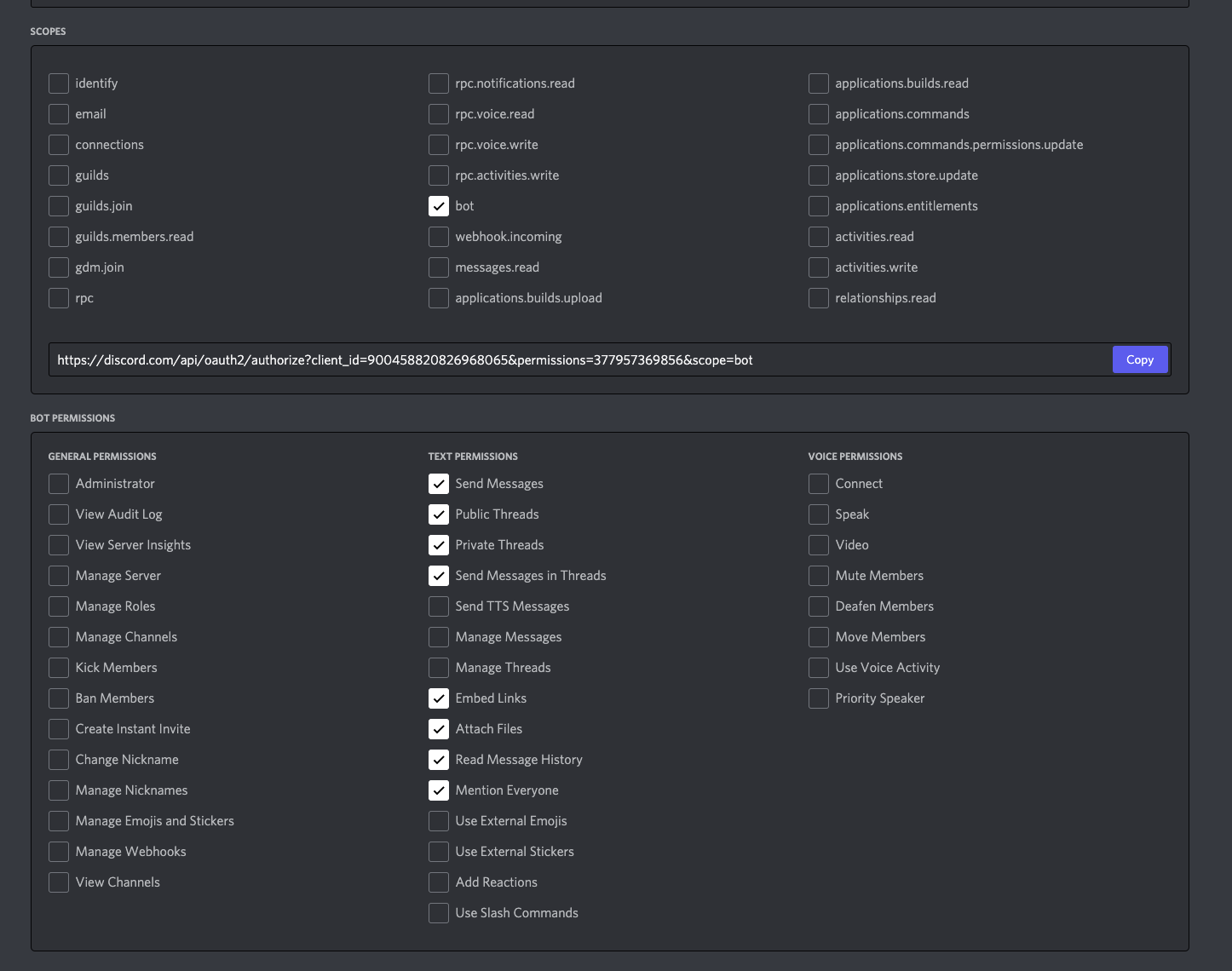
Once the cardbot and cordebot bots are setup, you can then configure environment variables for running the bot tests. Specifically:
- CORDE_BOT_ID: The bot ID for the cordebotCORDE_BOT_TOKEN
- : The bot token for the cordebotCARDBOT_ID
- : The bot ID for the cardbotCARDBOT_TOKEN
- : The bot token for the cardbotCARDBOT_ALLOWED_GUILDS
- : A comma separated list of the discord server IDs that the cardbot is allowed to communicate on. This should be the server(s) that you added the cardbot to.CARDBOT_ALLOWED_CHANNELS
- : A comma separated list of channel IDs the cardbot is allowed to communicate in.
(Note: to easily obtain server and channel ID's enable User Settings -> Advanced -> Enable Developer Mode in Discord. This will reveal a "Copy ID" item in the settings panel for servers and channels to retrieve these ID's.)
You need to build the hub via yarn build, or start watching for live rebuilds with yarn rebuild.
The following command will create a hub_development database on your locally running postgres server
`sh`
createdb hub_development
yarn db:migrate up
dist/hub.js db seed
dist/hub.js db dump
NODE_ENV=test dist/hub.js db init
`shStarts the server on port 3000
dist/hub.js server
Database migrations
sh
Run available migrations
yarn db:migrate up#To reverse the last migration:
yarn db:migrate down
#To redo the last migration (i.e. down + up):
yarn db:migrate redo
Creating database migrations
yarn db:migrate create Documentation on how to create migration scripts is available at https://salsita.github.io/node-pg-migrate/#/migrations
After you have completed running your new DB migration script create a pg_dump of the DB in the
file using: dist/hub.js db dump
Application console
To test, debug and call isolated parts of the application within its context.
yarn console starts the application console.Examples:
$3
`js
Hub > const { Client } = require('pg');
Hub > const config = require('config');
Hub > const client = new Client(config.db.url);
Hub > await client.connect();
Hub > await client.query('SELECT * FROM merchant_infos');
`$3
js
Hub > const workerClient = await container.lookup('worker-client');
Hub > await workerClient.addJob('persist-off-chain-merchant-info', { id: 1 });
`Connecting to the database staging|production database on AWS
$3
Add the following to your
file:`
SSH over Session Manager
host i- mi-
    ProxyCommand sh -c "aws ssm start-session --target %h --document-name AWS-StartSSHSession --parameters 'portNumber=%p'"
Lookup the tunneling command and database password:
cd [PROJECTS]/cardstack/infra/configs/hub/[staging|production]
AWS_PROFILE=cardstack terraform output | grep tunnel_to_database
AWS_PROFILE=cardstack terraform output | grep postgres_password
Run the command, open a postgres client, and connect to localhost, port 55432 with username cardstack, password as looked up in previous step.
Provided APIs
APIs conform to the JSON API specification.
$3
$3
$3
$3
$3
$3
The Hub CLI
The hub CLI can be invoked from within the hub package
dist/hub.js
_💡 Tip: Add
to your .zshenv or .bash_profile to be to invoke hub directly (without the bin/)_The files that support the CLI are in the
cli/ directory. You can add your own by following these instructions. The full yargs api can be found here.The Card Compiler
All compiler functionality is currently hidden behind the COMPILER feature flag. So to start the server with card compiling and related routes, use that flag.
`
COMPILER=true dist/hub.js server
Note that this package is written in TypeScript, so be sure to run a TypesScript
compiler as you work.
See the project-wide README
for information about running the Hub and its tests locally.