@kyvg/vue3-notification
v3.1.0-7TypeScript
Vue.js Notification Library
0/weekUpdated 3 months agoMITUnpacked: 46.8 KB
Published by kyvg
npm install @kyvg/vue3-notification
!npm bundle size
Upgrade to v3.x
$3
-
title and text no longer render with v-html. Use dangerouslySetInnerHtml prop to render title and text with v-htmlVue.js notifications
This is a fork and port of Vue 2 vue-notifications created by euvl to now support Vue 3. If you're using Vue 2.x use his version.
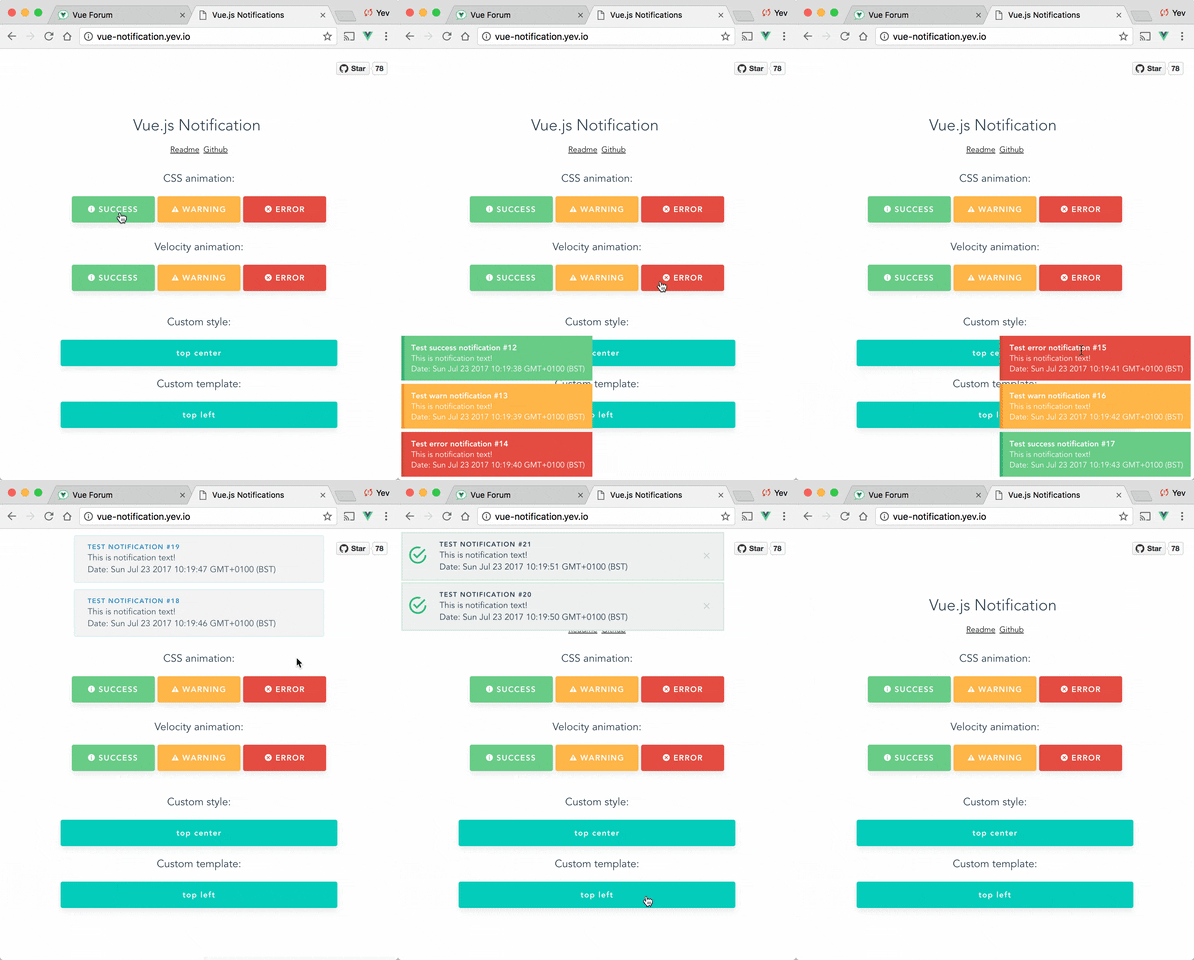
Setup
``bash
npm install --save @kyvg/vue3-notification
yarn add @kyvg/vue3-notification
`
Add dependencies to your main.js:
`javascript
import { createApp } from 'vue'
import Notifications from '@kyvg/vue3-notification'
const app = createApp({...})
app.use(Notifications)
`
Add the global component to your App.vue:
`vue`
Please note that this library does not inherently support Nuxt 3. To enable compatibility with Nuxt 3, use the nuxt3-notifications wrapper
Usage
Trigger notifications from your .vue files:
`javascript
// simple
this.$notify("Hello user!");
// using options
this.$notify({
title: "Important message",
text: "Hello user!",
});
`
Or trigger notifications from other files, for example, your router:
`javascript
import { notify } from "@kyvg/vue3-notification";
notify({
title: "Authorization",
text: "You have been logged in!",
});
`
Or use Composition API style:
`javascript
import { useNotification } from "@kyvg/vue3-notification";
const { notify } = useNotification()
notify({
title: "Authorization",
text: "You have been logged in!",
});
`$3
#### Vue 2.x syntax
`javascript`
Vue.notify({
title: "Vue 2 notification",
});
#### Vue 3.x syntax
`javascript
import { notify } from "@kyvg/vue3-notification";
notify({
title: "Vue 3 notification 🎉",
});
`
#### Vue 3.x Composition API syntax
`javascript
import { useNotification } from "@kyvg/vue3-notification";
const notification = useNotification()
notification.notify({
title: "Vue 3 notification 🎉",
});
`
Also you can use destructuring assignment
`javascript
import { useNotification } from "@kyvg/vue3-notification";
const { notify } = useNotification()
notify({
title: "Vue 3 notification 🎉",
});
`
$3
The majority of settings for the Notifications component are configured using props:
`vue`
Note that all props are optional.
| Name | Type | Default | Description |
| ---------------- | ------------- | ------------------ | ----------------------------------------------------------------------------------------------------------------------- |
| position | String/Array | 'top right' | Part of the screen where notifications will pop out |
| width | Number/String | 300 | Width of notification holder, can be %, px string or number.css
Valid values: '100%', '200px', 200 |
| classes | String/Array | 'vue-notification' | List of classes that will be applied to notification element |
| group | String | null | Name of the notification holder, if specified |
| duration | Number | 3000 | Time (in ms) to keep the notification on screen (if negative - notification will stay forever or until clicked) |
| speed | Number | 300 | Time (in ms) to show / hide notifications |
| animation-type | String | 'css' | Type of animation, currently supported types are and velocity |css
| animation-name | String | null | Animation name required for animation |title
| animation | Object | Custom | Animation configuration for Velocity animation |
| max | Number | Infinity | Maximum number of notifications that can be shown in notification holder |
| reverse | Boolean | false | Show notifications in reverse order |
| ignoreDuplicates | Boolean | false | Ignore repeated instances of the same notification |
| closeOnClick | Boolean | true | Close notification when clicked |
| pauseOnHover | Boolean | false | Keep the notification open while mouse hovers on notification |
| dangerouslySetInnerHtml | Boolean | false | Use v-html to set and text |
$3
| Name | Type | Description |
| ---------------- | -------------------------------- | -------------------------------------------- |
| click | (item: NotificationItem) => void | The callback function that is triggered when notification was clicked
| destroy | (item: NotificationItem) => void | The callback function that is triggered when notification was destroyes
| start | (item: NotificationItem) => void | The callback function that is triggered when notification was appeared
$3
Notifications are triggered via the API:
`javascript
this.$notify({
// (optional)
// Name of the notification holder
group: 'foo',
// (optional)
// Title (will be wrapped in div.notification-title)
title: 'This is the title',
// Content (will be wrapped in div.notification-content)
text: 'This is some content',
// (optional)
// Class that will be assigned to the notification
type: 'warn',
// (optional, override)
// Time (in ms) to keep the notification on screen
duration: 10000,
// (optional, override)
// Time (in ms) to show / hide notifications
speed: 1000
// (optional)
// Data object that can be used in your template
data: {}
})
`
To remove notifications, include the clean: true parameter.
`javascript`
this.$notify({
group: "foo", // clean only the foo group
clean: true,
});
$3
Configure the plugin itself using an additional options object:
`js`
app.use(Notifications, { name: "alert" });
All options are optional:
| Name | Type | Default | Description |
| ------------- | ------ |----------------|-------------------------------------------------------------------------------|
| name | String | notify | Defines the instance name. It's prefixed with the dollar sign. E.g. $notify |
| componentName | String | Notifications | The component's name |
| velocity | Object | undefined | A Velocity library object (see Animation) |
> Note: setting componentName can cause issues when using SSR.
TypeScript Support
This library is written with TypeScript. Since the notification component is registered globally, you need to register its types.
You can do this manually:
`ts`
import type { FunctionalComponent } from 'vue';
import type { Notifications } from '@kyvg/vue3-notification';
declare module 'vue' {
export interface GlobalComponents {
Notifications: FunctionalComponent
}
}
Or, you can use built-in resolver. This resolver allows you to seamlessly integrate this library with Vue projects using unplugin-vue-components. It automates the import of components, making your development process more efficient.
$3
To get started, install the necessary packages using npm or yarn:
`
bash
npm install --save @kyvg/vue3-notification unplugin-vue-components
or
yarn add @kyvg/vue3-notification unplugin-vue-components
`
$3
To configure the resolver, update your Vue project's plugin settings. For example, in a Vite project, modify vite.config.js:
js
import Components from 'unplugin-vue-components/vite';
import NotificationsResolver from '@kyvg/vue3-notification/auto-import-resolver';export default {
  plugins: [
    Components({
      resolvers: [NotificationsResolver()],
    }),
  ],
}
`
Specify the custom component's name if you have configured it:
js
// main.js
// ...
app.use(Notifications, { componentName: "Alert" });
`
Note that component name should be in PascalCasejs
import Components from 'unplugin-vue-components/vite';
import NotificationsResolver from '@kyvg/vue3-notification/auto-import-resolver';export default {
plugins: [
Components({
resolvers: [NotificationsResolver("Alert")],
}),
],
}
`
Features
$3
Position the component on the screen using the
prop:`vue
`It requires a
with two keywords for vertical and horizontal postion.Format:
".- Horizontal options:
left, center, right
- Vertical options: , bottomDefault is
.$3
Width can be set using a
number or string with optional % or px extensions:`vue
`$3
Set the
of a notification (warn, error, success, etc) by adding a type property to the call:`js
this.$notify({ type: "success", text: "The operation completed" });
`This will add the
(i.e. "success") as a CSS class name to the .vue-notification element.See the Styling section for how to hook onto the class and style the popup.
$3
For different classes of notifications, i.e...
- authentication errors (top center)
- app notifications (bottom-right)
...specify the
group attribute:`vue
`Trigger a notification for a specific group by specifying it in the API call:
javascript
this.$notify({ group: "auth", text: "Wrong password, please try again" });
`Customisation
$3
Vue Notifications comes with default styling, but it's easy to replace with your own.
Specify one or more class hooks via the
prop on the global component:`vue
`This will add the supplied class/classes to individual notification elements:
html


    Info
    You have been logged in
`Then include custom css rules to style the notifications:
scss
// style of the notification itself
.my-notification {
  /.../  // style for title line
  .notification-title {
    /.../
  }  // style for content
  .notification-content {
    /.../
  }  // additional styling hook when using
type parameter, i.e. this.$notify({ type: 'success', message: 'Yay!' })
&.success {
/.../
}
&.info {
/.../
}
&.error {
/.../
}
}
`Note that the default rules are:
scss
.vue-notification {
  // styling
  margin: 0 5px 5px;
  padding: 10px;
  font-size: 12px;
  color: #ffffff;  // default (blue)
  background: #44a4fc;
  border-left: 5px solid #187fe7;  // types (green, amber, red)
  &.success {
    background: #68cd86;
    border-left-color: #42a85f;
  }  &.warn {
    background: #ffb648;
    border-left-color: #f48a06;
  }  &.error {
    background: #e54d42;
    border-left-color: #b82e24;
  }
}
`$3
To completely replace notification content, use Vue's slots system:
vue


        {{ props.item.title }}
`The
object has the following members:| Name | Type | Description |
| ----- | -------- | ------------------------------------ |
| item | Object | Notification object |
| close | Function | A function to close the notification |
$3
Vue Notification can use the Velocity library to power the animations using JavaScript.
To use, manually install
velocity-animate & pass the library to the vue-notification plugin (the reason for doing that is to reduce the size of this plugin).In your
main.js:`javascript
import { createApp } from 'vue'
import Notifications from '@kyvg/vue3-notification'
import velocity from 'velocity-animate'const app = createApp({...})
app.use(Notifications, { velocity })
`In the template, set the
prop:`vue
`The default configuration is:
js
{
  enter: { opacity: [1, 0] },
  leave: { opacity: [0, 1] }
}
`To assign a custom animation, use the
prop:`vue
`Note that
and leave can be an object or a function that returns an object:`javascript
computed: {
animation () {
return {
/**
* Animation function
*
* Runs before animating, so you can take the initial height, width, color, etc
* @param {HTMLElement} element The notification element
*/
enter (element) {
let height = element.clientHeight
return {
// animates from 0px to "height"
height: [height, 0], // animates from 0 to random opacity (in range between 0.5 and 1)
opacity: [Math.random() * 0.5 + 0.5, 0]
}
},
leave: {
height: 0,
opacity: 0
}
}
}
}
`Programmatically Closing
javascript
// You can use either a number or a string as a unique ID
const id = Date.now();
const strId = 'custom-notification-42';this.$notify({
id,
text: 'This message will be removed immediately'
});
this.$notify({
id: strId,
text: 'This message will also be removed immediately'
});
this.$notify.close(id);
this.$notify.close(strId);
`Or with composition API style:
javascript
import { useNotification } from "@kyvg/vue3-notification"const { notify } = useNotification();
// IDs can be numbers or strings
const id = Date.now();
const strId = 'custom-notification-42';
notify({ id, text: 'Numeric ID example' })
notify({ id: strId, text: 'String ID example' })
notify.close(id);
notify.close(strId);
`FAQ
Check closed issues with
label to get answers for most asked questions.Development
To contribute to the library:
`bash
build main library
npm install
npm run buildrun tests
npm run testwatch unit tests
npm run unit:watch
``