@syncfusion/ej2-angular-barcode-generator
v32.2.3-ngccTypeScript
Barcode generator component is a pure JavaScript library which will convert a string to Barcode and show it to the user. This supports major 1D and 2D barcodes including coda bar, code 128, QR Code. for Angular
0/weekUpdated 4 days agoSEE LICENSE IN licenseUnpacked: 200.5 KB
Published by Syncfusion Inc.
npm install @syncfusion/ej2-angular-barcode-generatorAngular Barcode Generator Component
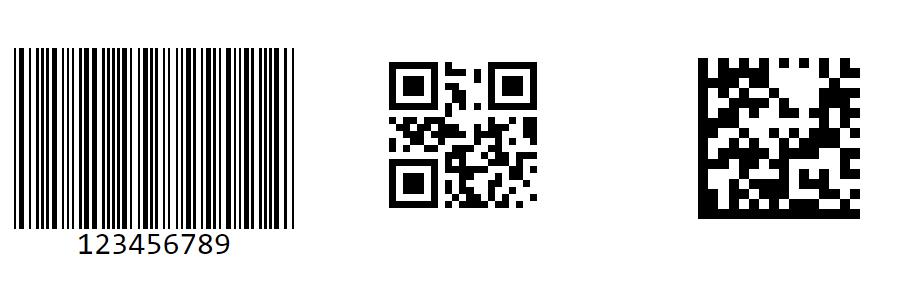
The Angular Barcode (QR Code) Generator Component is a light-weight and high-performance control that displays industry-standard 1D and 2D barcodes in Angular applications. Generated barcodes are optimized for printing and on-screen scanning. It is designed for ease of use and does not require fonts.
Getting started .
Online demos .
Learn more
Trusted by the world's leading companies

Setup
$3
You can use Angular CLI to setup your Angular applications. To install the Angular CLI, use the following command.
``bash`
npm install -g @angular/cli
Create a new Angular application using the following Angular CLI command.
`bash`
ng new my-app
cd my-app
$3
All Syncfusion Angular packages are available in npmjs.com. To install the Angular barcode generator package, use the following command.
`bash`
npm install @syncfusion/ej2-angular-barcode-generator --save
The above command does the below configuration to your Angular app.
* Adds @syncfusion/ej2-angular-barcode-generator package and its peer dependencies to your package.json file.BarcodeGeneratorAllModule
* Imports the , QRCodeGeneratorAllModule, DataMatrixGeneratorAllModule in your application module app.module.ts.angular.json
* Registers the Syncfusion UI default theme (material) in the file.
This makes it easy to add the Syncfusion Angular Barcode Generator module to your project and start using it in your application.
$3
In src/app/app.component.ts, use selector in the template attribute of the @Component directive to render the Syncfusion Angular Barcode Generator component.
`typescript
import { Component, OnInit } from '@angular/core';
@Component({
selector: 'app-root',
template:
})
export class AppComponent implements OnInit {}
Supported frameworks
Barcode component is also offered in the following list of frameworks.
| 
JavaScript | 
React | 
Vue | 
ASP.NET Core | 
ASP.NET MVC |
| :-----: | :-----: | :-----: | :-----: | :-----: |
Showcase samples
* Expense Tracker - Source, Live Demo
* Loan Calculator - Source, Live Demo
* Fitness Tracker - Source, Live Demo
Key features
* Barcode Symbologies - Supports a wide range of barcode symbologies, including:
* QR Code
* Data Matrix
* Code 39
* Code 39 Extended
* Codabar
* Code 32
* Code 93
* Code 128
* Code 128A
* Code 128B
* Code 128C
* EAN-8
* EAN-13
* UPC-A
* UPC-E
* Text Customization - Allows you to customize the text displayed.
* Exporting - Barcode can be exported as .png or .jpeg fromat image and can also be exported as base64 string.
Support
Product support is available through the following mediums.
* Support ticket - Guaranteed Response in 24 hours | Unlimited tickets | Holiday support
* Community forum
* GitHub issues
* Request feature or report bug
* Live chat
Changelog
Check the changelog here. Get minor improvements and bug fixes every week to stay up to date with frequent updates.
License and copyright
> This is a commercial product and requires a paid license for possession or use. Syncfusion’s licensed software, including this component, is subject to the terms and conditions of Syncfusion's EULA. To acquire a license for 80+ Angular UI components, you can purchase or start a free 30-day trial.
> A free community license is also available for companies and individuals whose organizations have less than $1 million USD in annual gross revenue and five or fewer developers.
See LICENSE FILE for more info.
© Copyright 2026 Syncfusion® Inc. All Rights Reserved. The Syncfusion® Essential Studio® license and copyright applies to this distribution.