CBP Common Framework UI Theme
npm install cbp-themeCustoms and Border Protection (CBP) Theme
==========


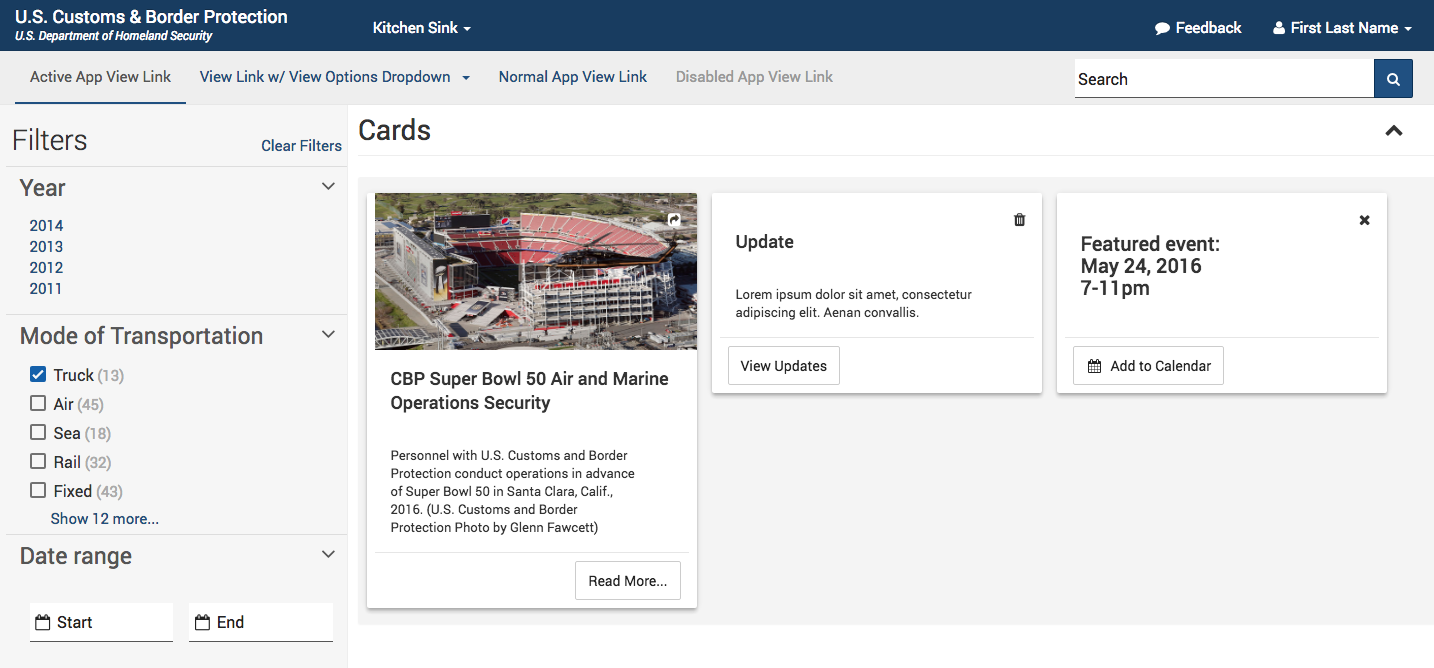
This is the common UI theme for CBP. It is used for internal and external web applications. We encourage the reuse of the theme and welcome contributions. The theme is a set of artifacts (CSS, Javascript, and fonts), and we provide a static html page to demonstrate all the components available called the Kitchen Sink. We also provide a Style Guide to give guidance on how to use each component or pattern.
This project is based on Bootstrap 3 and Google's Material Design Lite open source projects that allows us to easily create and maintain. It is based on SASS.
___
___
From your npm project, simply run:
* npm install cbp-theme --save
Or if you are using the yarn package manager:
* yarn add cbp-theme
Note: It is recommended that you use npm to manage your frontend dependencies.
If you are not using npm, see alternative installations for other ways to get cbp-theme.
The CBP Theme artifacts are in thenode_modules/cbp-theme/dist directory.
The dist directory contains:
* cbp-theme.css - Full Combined Content
* cbp-theme.min.css - For production Use
* cbp-theme.min.css.map - Mapped to scss for debugging
* cbp-theme.browser.bundle.umd.js This contains everything you need except jQuery for browser consumption.
* cbp-theme.esm5.js ESM5 Module are for use in your builds e.g. Angular, React, Webpack
* cbp-theme.umd.js UMD Module without any dependencies bundled in in case you have the dependencies added separately.
* cbp-theme-inputmask.umd.js jQuery Inputmask bundled with few minimum inputmask plugins required for style. Use this with cbp-theme.browser.bundle.umd.js or cbp-theme.umd.js.
fontawesome.* Font Awesome Icons referenced by css
Roboto-.* - Roboto Fonts referenced by css
* scss/ - For those who want to import scss files shown below:-
``
dist/
├── scss
│   ├── vendor
│   │   ├── _selectize_mdl_theme.scss
│   │   ├── _select2_mdl_theme.scss
│   │   ├── _roboto.scss
│   │   ├── _nouislider.scss
│   │   ├── _mdl-selectfield.scss
│   │   ├── _material_images.scss
│   │   ├── _material_custom.scss
│   │   ├── _material_cards.scss
│   │   ├── _material.scss
│   │   ├── _fontawesome.scss
│   │   ├── _datepicker.scss
│   │   └── _bootstrap.scss
│   ├── main.scss
│   └── custom
│       ├── _variables.scss
│       ├── _utilities.scss
│       ├── _type.scss
│       ├── _timelines.scss
│       ├── _tags.scss
│       ├── _tabs.scss
│       ├── _tables.scss
│       ├── _steps.scss
│       ├── _sliders.scss
│       ├── _popup.scss
│       ├── _navbar.scss
│       ├── _modals.scss
│       ├── _mixins.scss
│       ├── _load-spinners.scss
│       ├── _labels.scss
│       ├── _hacks.scss
│       ├── _globals.scss
│       ├── _forms.scss
│       ├── _filters.scss
│       ├── _containers.scss
│       ├── _colors.scss
│       ├── _buttons.scss
│       ├── _badges.scss
│       ├── _alerts.scss
│       └── _accordions.scss
`
Whether you are using Webpack or Rullup cbp-theme package is distributed with cbp-theme.esm5.js as module.
This allows you to import the required functions as below and your build will pickup the correct 3rd party dependencies installed as cbp-theme dependencies:
import {applyCharLimit, applyDatePicker, applyTags, applyThirdPartySelect } from 'cbp-theme';
Using the cbp theme is as easy as including cbp-theme.min.css and cbp-theme.browser.bundle.umd.js in your markup.
Optionally cbp-theme-inputmask.umd.js can be used for inputmask.
Note: cbp-theme does require jQuery 3.x or higher to be included before adding cbp-theme.js.
This option is meant for in browser consumption only as apposed to using in your build.
Refer to kitchensink/index.html for markup reference.
For more advanced users checkout wiki Guide to Importing Style Sheets.
To get started developing, see developer readme here.