mepcli
v1.2.0TypeScript
Zero-dependency, interactive CLI prompt
0/weekUpdated 2 days agoMITUnpacked: 725.4 KB
Published by CodeTease
npm install mepcliMep
(Mep Basic Prompts)
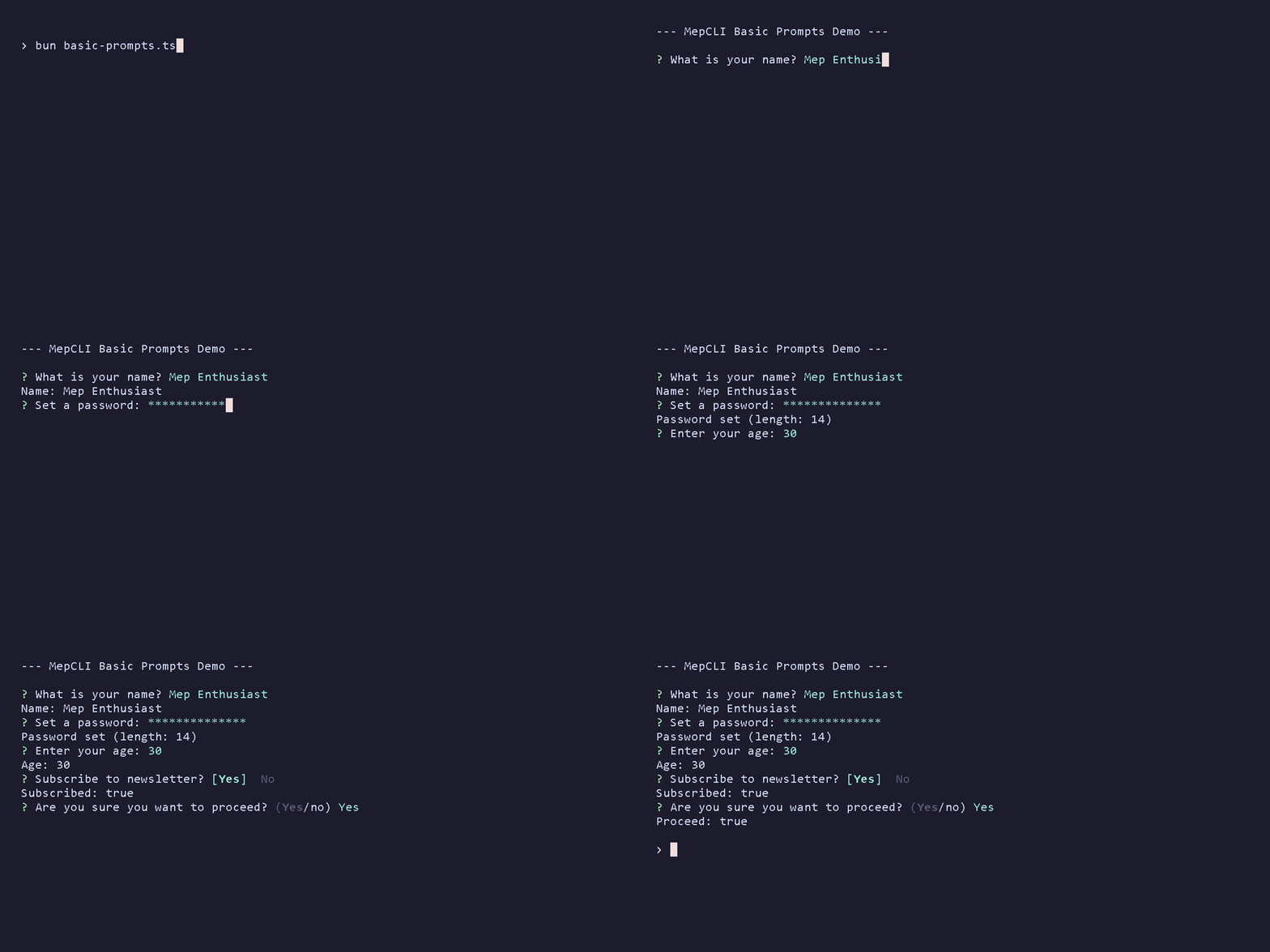
Mep is a lightweight and zero-dependency library for creating interactive command-line prompts in Node.js. It focuses on simplicity, modern design, and robust input handling.
A CodeTease project.
Features
- Zero Dependency: Keeps your project clean and fast.
- Comprehensive: 70+ prompt types for every need.
- Mouse Support: Built-in scroll and click interaction.
- Responsive: Fluid cursor movement and validation.
- Elegant: Modern ANSI color styling.
Installation
``sh`
npm install mepclior
yarn add mepcli
Quick Start
`typescript
import { MepCLI } from 'mepcli';
async function main() {
// 1. Text Input
const name = await MepCLI.text({
message: "What's your name?",
placeholder: "John Doe"
});
// 2. Select Menu
const lang = await MepCLI.select({
message: "Choose language:",
choices: [
{ title: "JavaScript", value: "js" },
{ title: "TypeScript", value: "ts" }
]
});
// 3. Confirm
const ready = await MepCLI.confirm({
message: "Ready to deploy?"
});
console.log({ name, lang, ready });
}
main();
`
> 💡 Want more? Check out the full feature demo in example.ts or browse the examples/ directory. Or see GALLERY.md for media demos.
Prompt Types
$3
Essential prompts for everyday input.
| Function | Description |
| :--- | :--- |
| text | Single line or multiline text input. |password
| | Masked text input (*). |secret
| | Completely hidden text input. |number
| | Numeric input with increment/decrement. |confirm
| | Yes/No question. |toggle
| | On/Off switch (True/False). |select
| | Single item selection from a list. |list
| | Enter a list of tags/strings. |
$3
Powerful tools for selecting dates, files, colors, and more.
| Function | Description |
| :--- | :--- |
| checkbox | Multiple choice selection. |multiSelect
| | Multiple selection with filtering. |multiColumnSelect
| | Selection with grid layout. |fuzzyMultiColumn
| | Grid layout + Fuzzy search combination. |fuzzySelect
| | Selection with fuzzy search. |autocomplete
| | Async searchable selection. |selectRange
| | Select a continuous range (start-end). |multiRange
| | Select multiple discontinuous ranges. |treeSelect
| | Hierarchical multi-selection. |grid
| | 2D matrix selection (rows x columns). |seat
| | Seat selection map with gaps. |emoji
| | Emoji picker with history. |color
| | RGB/Hex color picker. |date
| | Date and time picker. |calendar
| | Interactive calendar for dates/ranges. |time
| | Time picker. |file
| | File system navigator. |breadcrumb
| | Breadcrumb navigation style. |breadcrumbSearch
| | Breadcrumb navigation with local fuzzy search. |miller
| | Miller columns navigation. |tree
| | Hierarchical tree navigation. |
$3
Complex interfaces for structured data.
| Function | Description |
| :--- | :--- |
| table | Display data in columns and select rows. |spreadsheet
| | Interactive table editor. |inspector
| | JSON data explorer/editor. |schedule
| | Gantt chart timeline. |kanban
| | Kanban board (Drag & Drop). |heatmap
| | Grid intensity selector. |sort
| | Reorder a list of items. |sortGrid
| | Rearrange items in a 2D grid. |transfer
| | Move items between two lists. |match
| | Link items between source and target. |map
| | Key-Value editor. |form
| | Multi-field input form. |snippet
| | Template string filling. |cron
| | Cron schedule builder. |code
| | Code/JSON editor with syntax highlighting. |
$3
tailored for specific data formats.
| Function | Description |
| :--- | :--- |
| ip | IPv4 address input. |semver
| | Semantic versioning bumper. |otp
| | One Time Password (PIN) input. |byte
| | Byte size input (KB, MB, GB). |rating
| | Star rating input. |slider
| | Visual numeric slider. |range
| | Dual-handle slider (min-max). |dial
| | Rotary knob for numeric input. |calculator
| | Math expression evaluator. |region
| | ASCII map region selector. |pattern
| | Android-style pattern lock. |dependency
| | Checkbox with logic (Depends/Conflict). |license
| | License picker with Split View. |regex
| | Real-time regex validator. |box
| | Box model (CSS Margin/Padding) editor. |phone
| | International phone input with masking & country search. |connectionString
| | Database URL wizard. |curl
| (experimental) | Interactive HTTP request builder. |
$3
Add some personality to your CLI.
| Function | Description |
| :--- | :--- |
| slot | Slot machine randomizer. |gauge
| | Rhythm/accuracy game. |draw
| | Braille canvas drawing. |quizSelect
| | Multiple choice quiz. |quizText
| | Text answer quiz. |spam
| | Mash keys to confirm (fun mode). |
$3
Helper functions for better CLI UX.
| Function | Description |
| :--- | :--- |
| exec (experimental) | Run shell command with spinner. |scroll
| | Scrollable text viewer (e.g., License). |diff
| | Text merge conflict resolver. |editor
| | Open external editor (Vim/Nano). |shortcut
| | Record key combinations. |keypress
| | Wait for a specific key press. |wait
| | Pause for a few seconds. |spinner
| | Simple loading spinner control. |
Task Runner (Parallel Execution)
The Task Runner allows you to manage multiple concurrent tasks (Spinners & Progress Bars) with a flicker-free rendering engine. It supports real-time updates and is completely zero-dependency.
`typescript
const tasks = MepCLI.tasks();
// 1. Define Tasks
tasks.add('install', { title: 'Installing dependencies', type: 'spinner' });
tasks.add('download', { title: 'Downloading core', type: 'progress', total: 100 });
// 2. Start Loop
tasks.run();
// 3. Update Tasks
tasks.start('install');
tasks.start('download', 'Connecting...');
// ...Async operations...
tasks.update('download', { current: 50, message: '50/100 MB' });
// 4. Complete
tasks.success('install', 'Done!');
tasks.success('download', 'Downloaded');
tasks.stop();
`
Pipeline (Workflow Engine) (Experimental)
The Pipeline API allows you to orchestrate a sequence of prompts that share a common context. It follows the Enter-and-Forget philosophy (exceptions stop the flow) and uses a fluent Builder pattern.
`typescript`
const result = await MepCLI.pipeline()
.step('name', () => MepCLI.text({ message: 'Name:' }))
.stepIf(
(ctx) => ctx.name === 'admin',
'role',
() => MepCLI.select({
message: 'Role:',
choices: ['SuperUser', 'Maintainer']
})
)
.run();
Keyboard & Mouse Support
MepCLI automatically detects modern terminals and enables Mouse Tracking (using SGR 1006 protocol) for scrolling and clicking.
$3
Calendar Prompt
Mep's Calendar prompt supports advanced navigation and selection shortcuts for power users.
* Keyboard:
* Arrow Keys: Move cursor day by day.PageUp
* / PageDown: Jump to previous/next Month.Ctrl + Up
* / Ctrl + Down: Jump to previous/next Year.Home
* / End: Jump to the first/last day of the current month.t
* : Jump immediately to Today.Enter
* : Select date (or start/end of range).
* Mouse:
* Scroll: Navigate Months.Ctrl + Scroll
* : Adjust the selected Day (cursor movement).
Color Prompt
* Keyboard:
* Tab: Switch between RGB channels.Up
* / Down: Move between channels.Left
* / Right: Adjust current channel value.Shift + Left
* / Shift + Right: Fast adjust current channel value.
* Mouse:
* Scroll: Adjust the current channel value.Ctrl + Scroll
* : Fast adjust.
Checkbox Prompt
* Keyboard:
* Space: Toggle selection.a
* : Select All.x
* / n: Select None.i
* : Invert selection.
MultiSelect Prompt
* Keyboard:
* Space: Toggle selection.Ctrl + A
* : Select All (Visible).Ctrl + X
* : Deselect All (Visible).Typing
* : Filter list.
Transfer Prompt
* Keyboard:
* Tab / Left / Right: Switch focus between Source and Target.Space
* : Move selected item.a
* / >: Move All to Target.r
* / <: Move All to Source (Reset).
Tree & TreeSelect Prompt
* Keyboard:
* Right: Expand folder or jump to child.Left
* : Collapse folder or jump to parent.Space
* : Toggle expansion (Tree) or Checkbox (TreeSelect).e
* : Expand all recursively.c
* : Collapse all recursively.
Grid Prompt
The Grid prompt (Matrix selection) includes robust shortcuts for bulk actions.
* Keyboard:
* Arrow Keys: Move cursor.PageUp
* / PageDown: Jump to the first/last Row.Home
* / End: Jump to the first/last Column.Space
* : Toggle current cell.r
* : Toggle entire Row.c
* : Toggle entire Column.a
* : Select All.x
* : Deselect All (None).i
* : Invert selection.
* Mouse:
* Scroll: Vertical navigation (Rows).Shift + Scroll
* : Horizontal navigation (Columns).
Map Prompt
* Keyboard:
* Ctrl + N: Add new row.Ctrl + D
* : Delete current row.Arrows
* / Tab: Navigate cells.
IP Prompt
* Keyboard:
* typing...: Auto-jumps to next octet after 3 digits or ..Backspace
* : Navigates back to previous octet if empty.
Kanban Prompt
* Keyboard:
* Arrows: Navigate items/columns.Space
* : Grab/Drop item (Drag & Drop mode).Enter
* : Submit.
* Mouse:
* Scroll: Navigate items (Normal) or Move item Left/Right (Grabbed).
Time Prompt
* Keyboard:
* Up / Down: Adjust value.Left
* / Right / Tab: Switch unit (Hour/Minute/AM-PM).
* Mouse:
* Scroll: Adjust value (Up/Down).
Heatmap Prompt
* Keyboard:
* Arrows: Navigate cells.Tab
* / Shift+Tab: Navigate cells (Horizontal).Space
* : Cycle value.0-9
* : Set value directly.
* Mouse:
* Scroll: Navigate rows (Vertical).
Emoji Prompt & MultiColumnSelect
* Keyboard:
* Arrows: Navigate grid.Typing
* : Filter/Search (Emoji only).
Miller Prompt
* Keyboard:
* Up / Down: Navigate items.Right
* / Enter / Tab: Expand child or Drill down.Left
* / Shift + Tab: Collapse or Go back.
Match Prompt
* Keyboard:
* Arrows: Navigate lists.Tab
* : Switch Source/Target.Space
* : Pick Source or Toggle Link.
Diff Prompt
* Keyboard:
* Left / Right: Switch Action (Original / Modified / Edit).Enter
* : Submit selection.
Dial Prompt
* Keyboard:
* Arrows: Adjust value (rotate knob).Enter
* : Submit.
* Mouse:
* Scroll: Adjust value.
Draw Prompt
* Keyboard:
* Arrows: Move cursor.Space
* : Toggle pixel.c
* : Clear canvas.i
* : Invert canvas.Enter
* : Submit.
* Mouse:
* Drag: Paint (Left Click) or Erase (Right Click).Click
* : Toggle pixel.
Breadcrumb Prompt
* Keyboard:
* Arrows: Navigate list.Enter
* : Drill down into folder.Backspace
* : Go up one level.
* Mouse:
* Scroll: Navigate list.
Schedule Prompt
* Keyboard:
* Arrows: Move task in time.Tab
* / Shift + Tab: Switch between tasks.Shift + Left/Right
* : Resize task duration.PageUp
* / PageDown: Scroll timeline horizontally.
* Mouse:
* Scroll: Scroll timeline horizontally.
Data Inspector
* Keyboard:
* Space / Arrows: Expand/Collapse nodes.Enter
* : Toggle Boolean or Edit String/Number.
* Mouse:
* Scroll: Navigate tree.
Seat Prompt
* Keyboard:
* Arrows: Navigate seat grid.Tab
* / Shift+Tab: Navigate Left/Right.Space
* : Select/Deselect seat.
* Mouse:
* Scroll: Navigate Up/Down.
Select Range Prompt & Multi Range Prompt
* Keyboard:
* Arrows (Up/Down): Navigate items.Space
* : Set/Unset anchor point (drag start) or commit range (drag end).Enter
* : Submit selected range(s).
Breadcrumb Search Prompt
* Keyboard:
* Arrows: Navigate.Typing
* : Enter Search Mode (filters current folder).Esc
* : Exit Search Mode.Enter
* : Drill down (Folder) or Select (File).
Sort Grid Prompt
* Keyboard:
* Arrows: Navigate grid.Tab
* / Shift+Tab: Navigate Left/Right.Space
* : Grab/Drop item.Enter
* : Submit grid.
* Mouse:
* Scroll: Navigate Up/Down.
Dependency Prompt
* Keyboard:
* Arrows: Navigate items.Space
* : Toggle item (Triggers auto-resolution).Enter
* : Submit selection.
* Mouse:
* Scroll: Navigate Up/Down.
Box Prompt
* Keyboard:
* Arrows / Tab: Navigate (Top -> Right -> Bottom -> Left).Shift + Tab
* : Navigate backwards.+
* / -: Increment/Decrement value.0-9
* : Type value directly.
* Mouse:
* Scroll: Cycle focus (Up=Backwards, Down=Forwards).
Phone Prompt
* Keyboard:
* Tab: Switch between Country Code and Number sections.Typing
* (in Country section): Fuzzy search for country (e.g., "Viet", "US").Arrows (Up/Down)
* : Cycle through countries.Backspace
* : Delete digit or clear search.
* Mouse:
* Scroll`: Cycle through countries (when Country section is active).
License
This project is under the MIT License.