toastedjs
v0.0.2
Javascript Toast Plugin - Easy, Responsive and Touch Compatible
3.7K/weekUpdated 3 years ago
Published by Shakeeb Sadikeen
npm install toastedjs


Introduction
toasted is responsive, touch compatible, easy to use, attractive and feature rich with icons, actions etc...
$3
demo here
$3
Source|Info
-----|-----
npm |
npm install toastedjs --save
yarn |
yarn add toastedjs
unpkg (js) | https://unpkg.com/toastedjs/dist/toasted.min.js
unpkg (css) | https://unpkg.com/toastedjs/dist/toasted.min.css
jsdelivr | https://jsdelivr.com/package/npm/toastedjs
Basic Usage
#### ES6
``
javascript


import Toasted from 'toastedjs'


import 'toastedjs/dist/toastedjs.min.css'

//import 'toastedjs/src/sass/toast.scss'


let toasted = new Toasted({ / your options.. / })

toasted.show('yo, toasted here !!')
`
#### Direct
`html
`
Guide


#### Actions


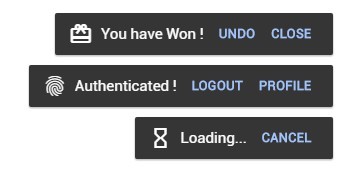
Actions are used to make the toasts interactive (save, undo, cancel, close), you can have one or more options on a single toast.
`javascript
// you can pass multiple actions as an array of actions
action : {
text : 'Save',
onClick : (e, toasted) => {
toasted.delete()
}
}
`
⬇ check action api below


#### Icons


Material Icons supported. you will have to import the icon packs into your project.
`javascript
{
// pass the icon name as string
icon : 'check'
// or you can pass an object
icon : {
name : 'watch',
after : true // this will append the icon to the end of content
}
}
`
 ⬇ check icons api below


Api


$3

below are the options you can pass to create a toast or you can set these options globally.
`javascript
// you can pass options either
let toasted = new Toasted({
position : 'top-center',
theme : 'alive',
onComplete : () => {
console.log('i am done !')
}
})
`
Option|Type's|Default|Description

-----|-----|-----|-----

position|String|'top-right'|Position of the toast container
 ['top-right', 'top-center', 'top-left', 'bottom-right', 'bottom-center', 'bottom-left']

duration|Number|null|Display time of the toast in millisecond

action|Object, Array|null| ⬇ check action api below

fullWidth|Boolean|FALSE|Enable Full Width

fitToScreen|Boolean|FALSE|Fits to Screen on Full Width

className|String, Array|null|Custom css class name of the toast

containerClass|String, Array|null|Custom css classes for toast container

Icon|String, Object|null| ⬇ check icons api below

type|String|'default'|Type of the Toast
 ['success', 'info', 'error']

theme|String|'primary'|Theme of the toast you prefer
 ['primary', 'outline', 'bubble']

onComplete|Function|null|Trigger when toast is completed


#### Actions


Parameters|Type's|Default|Description

-----|-----|-----|-----

text*|String|-| name of action

href|String|null| url of action
icon|String|null| name of material for action
class|String/Array|null| custom css class for the action
onClick|Function(e,toastObject) |null| onClick Function of action
#### Icons
Parameters|Type's|Default|Description
-----|-----|-----|-----
name*|String|-| name of the icon
color|String|null| color of the icon
after|Boolean|null| append the icon to end of the toast
$3
Methods available under ToastedJS
`javascript
// you can pass string or html to message
let toasted = new Toasted({ / global options / })
toasted.show( 'my message', { / some new option / })
`
Method|Parameter's|Description

-----|-----|-----

show|message*, options|Show a toast

success|message*, options|Show a toast success style

info|message*, options|Show a toast info style

error|message*, options|Show a toast error style

register|name, message[string,function(payload)]* , options|Register your own toast with options explained here

group|options|Create a new group of toasts (new toast container with its options)

clear|-|Clear all toasts


$3


Each Toast Returns a Toast Instance where you can manipulate the toast.
`javascript
let toasted = new Toasted()
let myToast = toasted.show("Holla !!")
myToast.text("Changing the text !!!").delete(1500)
let anotherToast = toasted.error("Oopss.. my bad !")
anotherToast.text("Oopss.. it's okey..")
``
Option|Type's|Description
-----|-----|-----
options|Object|Options of the toast instance
toast|HTMLElement|Html Element of the toast
text|Function(message)|Change text of the toast
delete|Function(delay = 300)|Delete the toast with animation and delay
destroy|Function|Destroy the toast unregister from parent instance
Browsers support
|
 IE / Edge |
  Firefox |
  Chrome |
  Safari |
  Opera |
  iOS Safari |
  Chrome for Android |
| --------- | --------- | --------- | --------- | --------- | --------- | --------- |
| IE10, IE11, Edge| last 7 versions| last 7 versions| last 7 versions| last 7 versions| last 3 versions| last 3 versions
Please Open and issue If You have Found any Issues.
Mobile Responsiveness
On Mobile Toasts will be on full width. according to the position the toast will either be on top or bottom.
Credits
+ Inspired and developed from materialize-css toast.
+ Uses hammerjs for touch events
+ Uses lightweight and fast animejs for animations.
+ Whoever contributes to this project :wink:
Enjoy Toasting !!